Browse documentation
Dashboard metrics
Each block of the Dashboard answers one question. The examples on this page use the numbers of the screenshots, with the period set to All time.
Match inbox
What is left to match?
The bar at the top counts the transactions and the invoices that are not fully matched yet. 18 tx · 14 inv means 18 transactions and 14 invoices.
This bar always shows today’s situation. It does not follow the period.
Select Clear unmatched to open the Match inbox. Invunion shows you its suggestions, one invoice and one payment at a time:
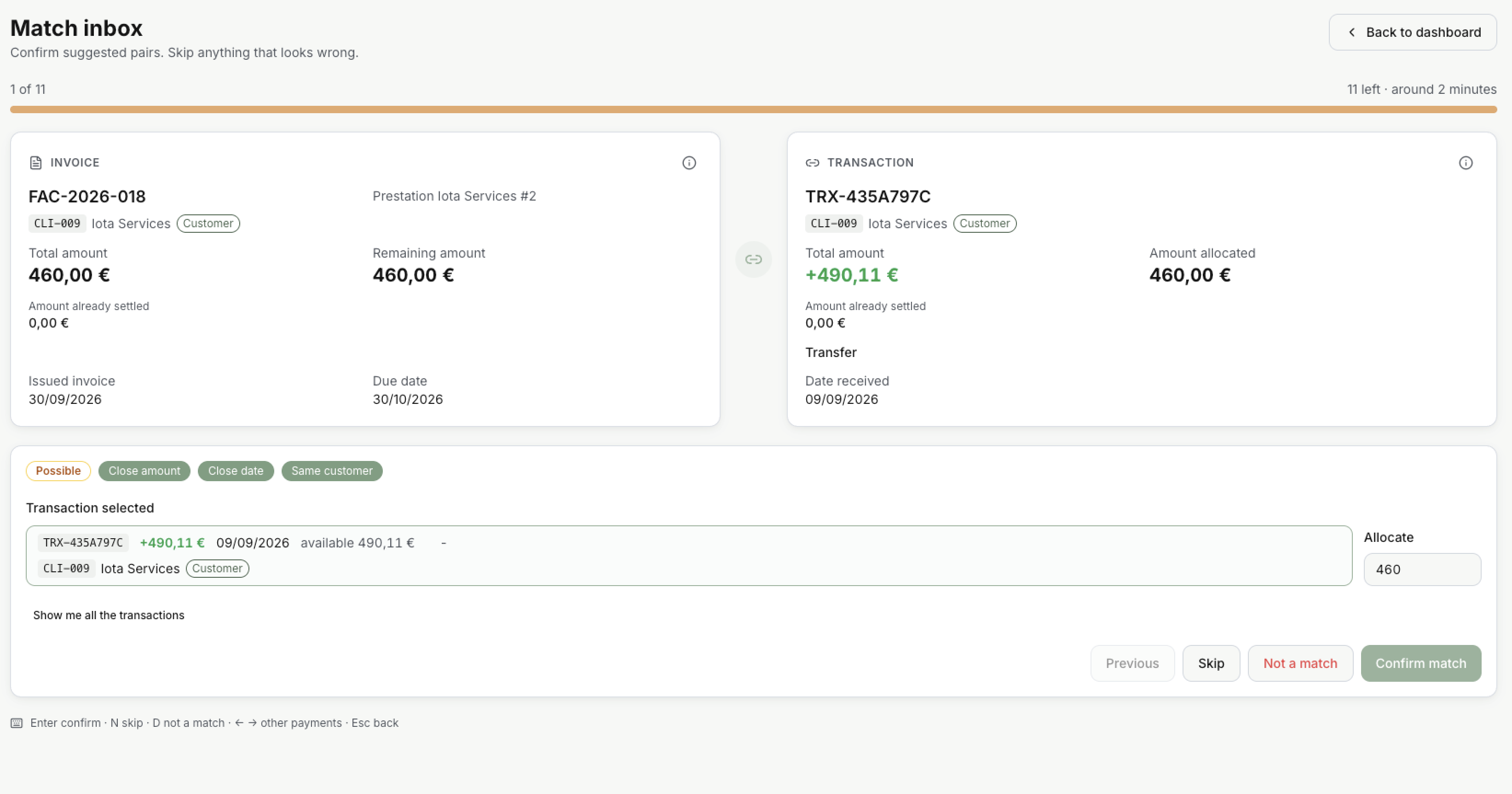
- At the top, where you are: here 1 of 11, with about 2 minutes left.
- On the left, the invoice and what is still due. On the right, the payment Invunion suggests.
- The badges say why this pair: how sure Invunion is, such as Possible, and what fits, such as Close amount, Close date or Same customer. See Match levels.
- Allocate is the part of the payment that goes to this invoice. Here 460 of the 490,11 €. You can change it.
- Choose what to do:
| Button | Key | What it does |
|---|---|---|
| Confirm match | Enter | Matches the payment to the invoice, and goes to the next pair. |
| Skip | N | Leaves this pair for later. |
| Not a match | D | Invunion will not suggest this payment for this invoice again. |
| Previous | Goes back to the pair before. |
Show me all the transactions lists other payments you can pick instead. The arrow keys ← → move between them. It also lists the pairs you marked Not a match: select one to restore it. Esc or Back to dashboard takes you back.
You can also match outside the inbox, and undo a match. See Matching and Unmatch.
When nothing is left, the inbox says You’re caught up.
Invoice matching
How many invoices of the period are paid?
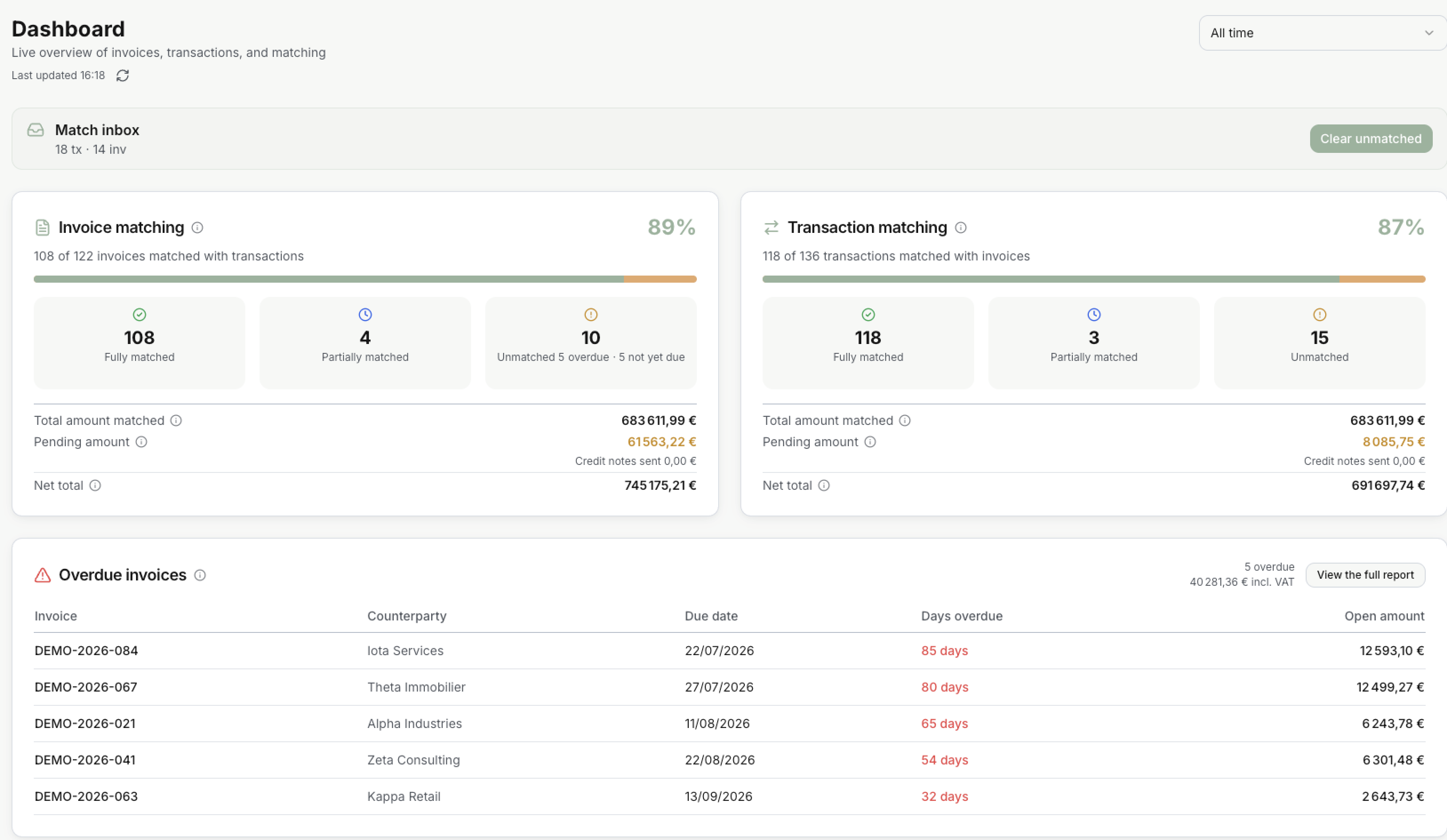
The percentage is the share of invoices that are fully paid. Here 108 of 122 invoices, so 89%. The bar shows the same thing: green for what is matched, orange for what is not.
Only the invoices issued in the period count. Cancelled invoices and credit notes do not.
| Box | What it counts |
|---|---|
| Fully matched | Nothing is due anymore. |
| Partially matched | Part is paid. The rest is still due. |
| Unmatched | Nothing is settled yet. It also says how many are overdue and how many are not yet due. |
Under the boxes, the amounts:
| Line | What it shows |
|---|---|
| Total amount matched | What is already settled on these invoices, by payments and by credit notes. |
| Pending amount | What is still due on them. |
| Credit notes sent | The credit notes paid back to customers in money. |
| Net total | What you invoiced, minus Credit notes sent. |
In the example: 683 611,99 € matched + 61 563,22 € pending = 745 175,21 € net total. No credit note was paid back, so the net total is the full amount invoiced.
Credit notes sent only counts the credit notes refunded by bank transfer. A credit note used on another invoice, or still available, is not deducted. See Credit notes.
Transaction matching
How many payments of the period found their invoice?
The percentage is the share of transactions that are fully matched. Here 118 of 136 transactions, so 87%.
Only the transactions in the period count, and only those in the reconciliation scope. Ignored lines are left out. See Status and scope.
| Box | What it counts |
|---|---|
| Fully matched | The whole amount is matched to invoices. |
| Partially matched | Part of the amount is matched. The rest is in Remaining. |
| Unmatched | No invoice is matched yet. |
The amounts only count the money received:
| Line | What it shows |
|---|---|
| Total amount matched | The part of the payments already matched to invoices. |
| Pending amount | The part not matched to an invoice yet. |
| Credit notes sent | The money that went out to refund a credit note. |
| Net total | What you received, minus Credit notes sent. |
In the example: 683 611,99 € matched + 8 085,75 € pending = 691 697,74 € net total.
Total amount matched is the same on both sides: it is the money that links an invoice to a payment. Pending amount is not. On the invoice side it is what customers still owe. On the transaction side it is money received that Invunion has not placed on an invoice yet.
How a match is made is explained in Matching and Match levels.
Overdue invoices
Who is late?
The table lists the overdue invoices with the oldest due date first, up to five. Each line shows the Invoice, the Counterparty, the Due date, the Days overdue and the Open amount, what is still due.
At the top right, the total: here 5 overdue for 40 281,36 € incl. VAT. Select View the full report, or a line, to open all overdue invoices in Invoices issued.
An invoice is overdue the day after its due date, if something is still due. See When is an invoice overdue?
This table always shows today’s situation. It does not follow the period.
Invoices issued, Credit notes issued, Transactions considered
What came in during the period?
| Card | What it counts |
|---|---|
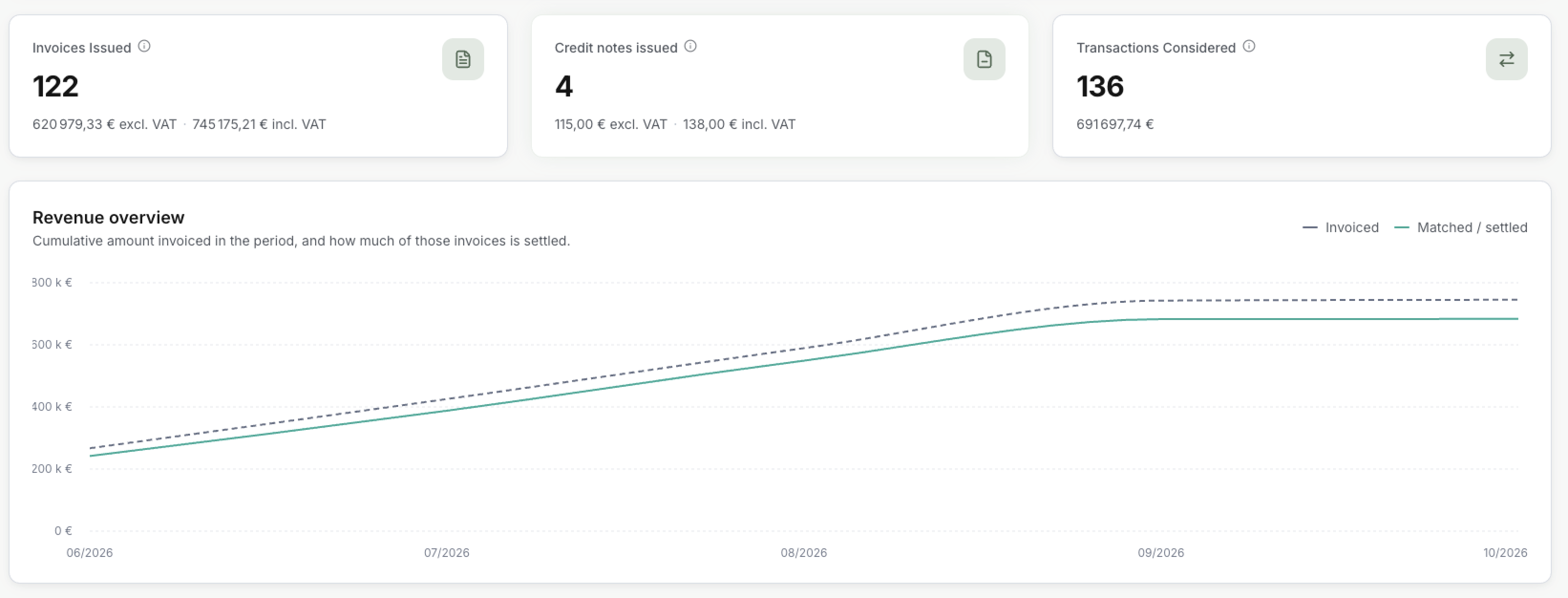
| Invoices issued | The invoices issued in the period, without the cancelled ones. The total is shown excluding and including VAT. |
| Credit notes issued | The credit notes issued in the period, without the cancelled ones. Also excluding and including VAT. |
| Transactions considered | The transactions of the period that Invunion tries to match, with their total. Ignored lines are left out. |
The numbers match the blocks above: 122 invoices in Invoice matching, 136 transactions in Transaction matching.
Select a card to open the list.
Revenue overview
How fast are invoices paid?
The chart adds up, day after day, what was invoiced in the period:
- Invoiced, the dashed line: the total of the invoices issued so far.
- Matched / settled, the green line: how much of those invoices is settled.
The closer the two lines, the less is still due. The gap between them at the end is the Pending amount of Invoice matching.
For a period of 45 days or less, the chart shows one point per day. Above that, one point per month.
Recent activity
What happened last?
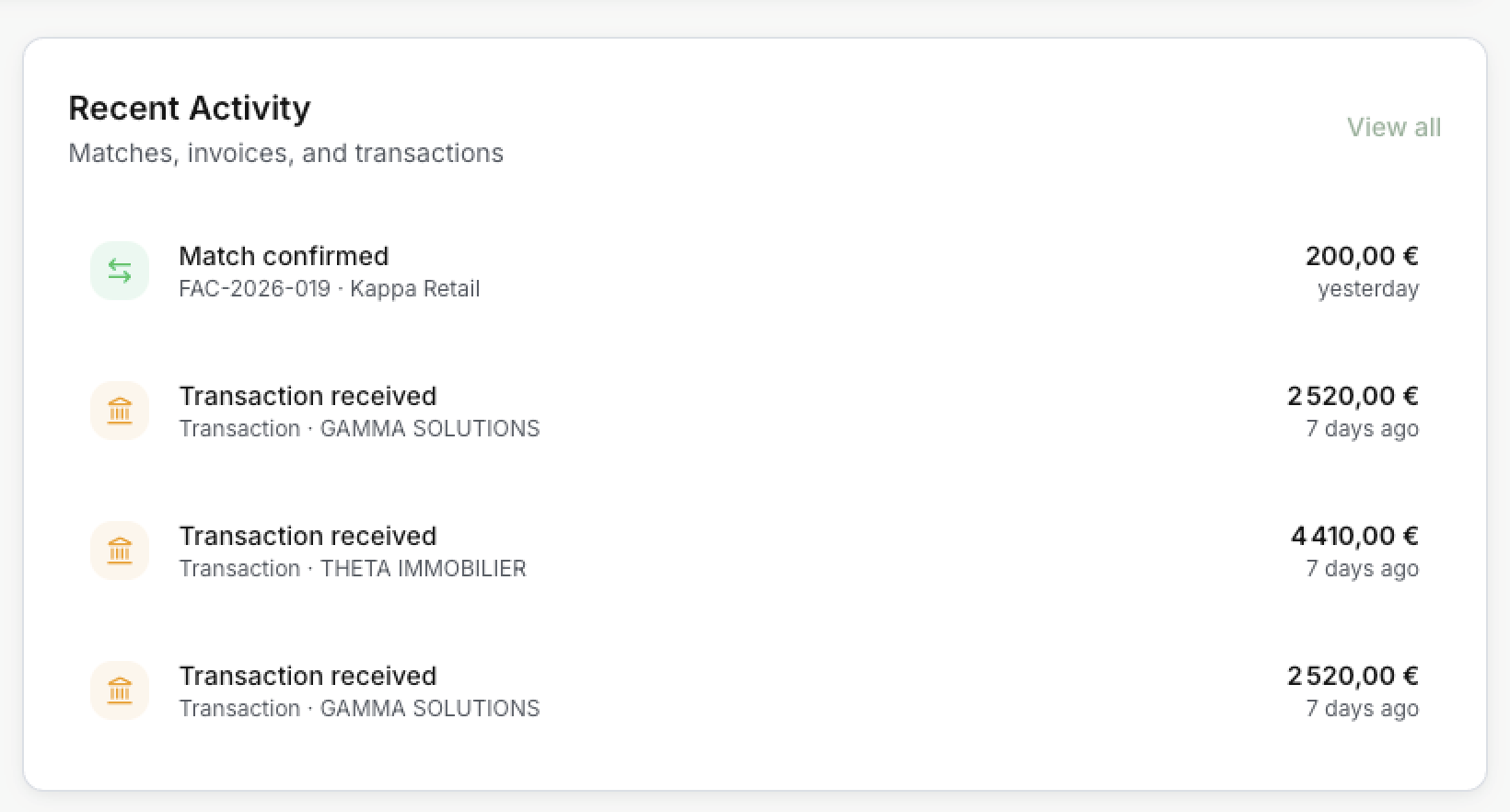
The last four events, newest first:
| Event | Meaning |
|---|---|
| Match confirmed | An invoice was matched to a payment. |
| Invoice created | An invoice was added, by import, API or by hand. |
| Transaction received | A new bank line came in. |
Select a line to open its list. View all opens Transactions.
This block always shows the last events. It does not follow the period.
Updated · View as Markdown