Browse documentation
Currency conversion
Settings > Finance > Currency conversion. This page lets Invunion match a payment with an invoice that is in another currency.
Until you turn it on, Invunion only matches a payment and an invoice in the same currency.
Connect it in four steps
You do not need an exchange-rate provider, an API key or a file. Invunion gets the rates itself.
- Allow currency conversion. Turn the switch on.
- Pick the company account. This is the bank account that receives the payments. It needs to exist first, either connected or created.
- Check the default account currency, for example EUR.
- Choose the currencies to be converted. These are the currencies of your invoices, for example USD or GBP. Each one is added to the rate table below.
That is all. The table fills in with the current rates.
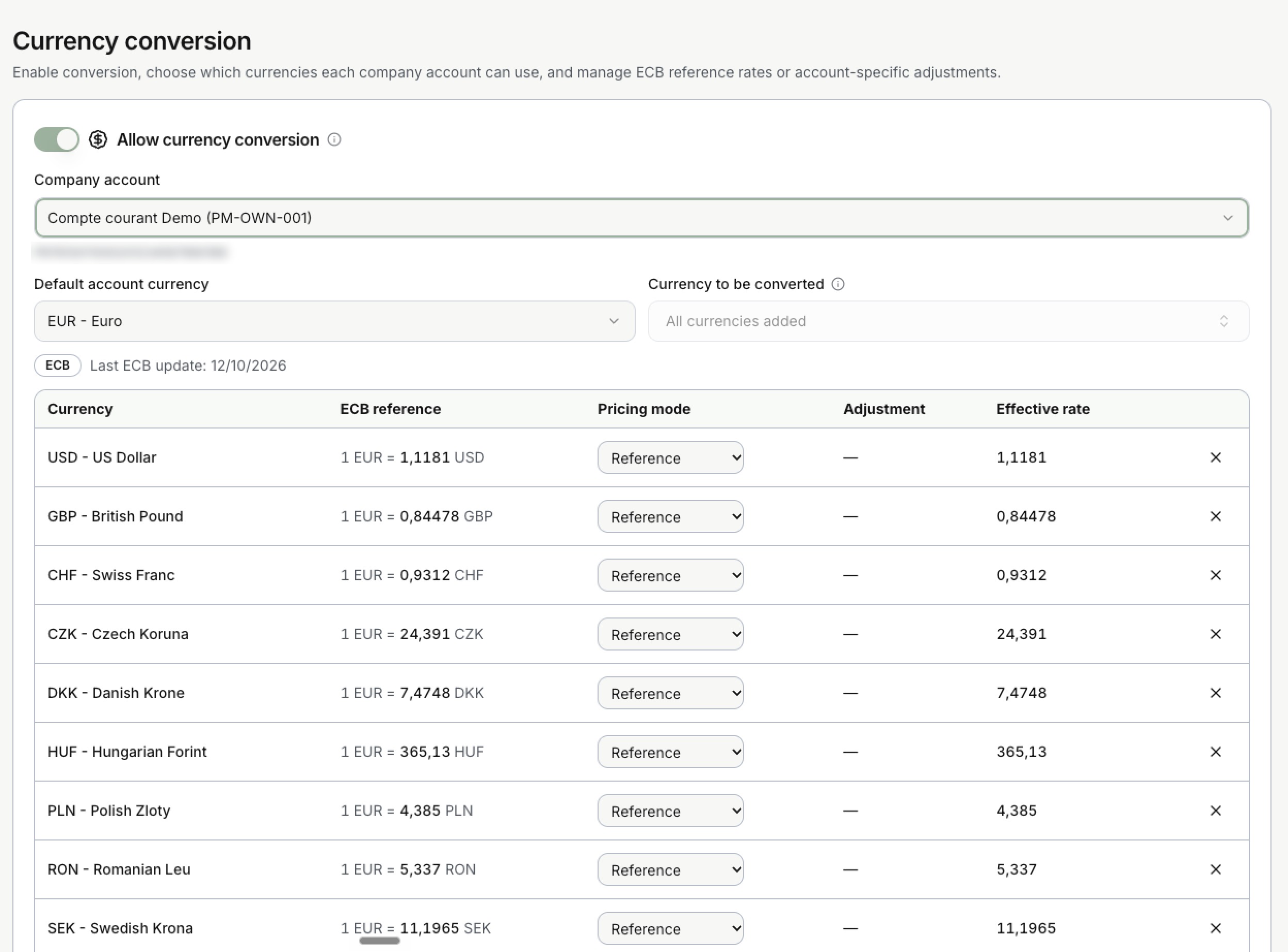
The page shows the date of the last ECB update. A currency that you do not select cannot be used to match.
Supported currencies
Invunion converts these 17 currencies. One of them is the currency of your account, and the others are the currencies of your invoices.
| Code | Currency | Code | Currency |
|---|---|---|---|
| EUR | Euro | NOK | Norwegian Krone |
| USD | US Dollar | TRY | Turkish Lira |
| GBP | British Pound | ISK | Icelandic Krona |
| CHF | Swiss Franc | AUD | Australian Dollar |
| CZK | Czech Koruna | CAD | Canadian Dollar |
| DKK | Danish Krone | SGD | Singapore Dollar |
| HUF | Hungarian Forint | NZD | New Zealand Dollar |
| PLN | Polish Zloty | RON | Romanian Leu |
| SEK | Swedish Krona |
Other currencies and cryptocurrencies are not converted. An invoice in one of them is only matched with a payment in the same currency.
How it relates to transactions and invoices
A bank transaction is always in the currency of the account it landed in. An invoice can be in another currency. When both are in the same currency, nothing changes. When they differ, Invunion uses the rate in the table:
- It takes the invoice amount.
- It converts it into the account currency with the rate of that currency, on the date of the transaction.
- It compares the result with the payment, then applies the usual match levels.
The rate used is the latest one published on or before the transaction date, so weekends and holidays use the previous day. If a rate is not available, Invunion does not invent one and the match is not made.
Once you confirm a match, Invunion keeps both amounts, the rate and its date. A later change of rate never rewrites it.
Pricing mode
Each currency has a pricing mode. It decides which exchange rate Invunion uses to compare an invoice in that currency with a payment in your account currency.
First, how to read a rate. The table writes it as 1 unit of your account currency = rate units of the other currency. For an account in EUR, 1 EUR = 1.1181 USD means one euro is worth 1.1181 dollars. To turn a dollar invoice into euros, Invunion divides it by the rate.
| Mode | What it does | Use it when |
|---|---|---|
| Reference | Uses the European Central Bank (ECB) daily rate as it is. This is the default. | Your invoices are priced at the market rate. |
| Markup | Raises the ECB rate by a percentage, from 0 to 100. | You priced your foreign-currency invoices with a margin over the ECB rate, and you want Invunion to use that same rate. |
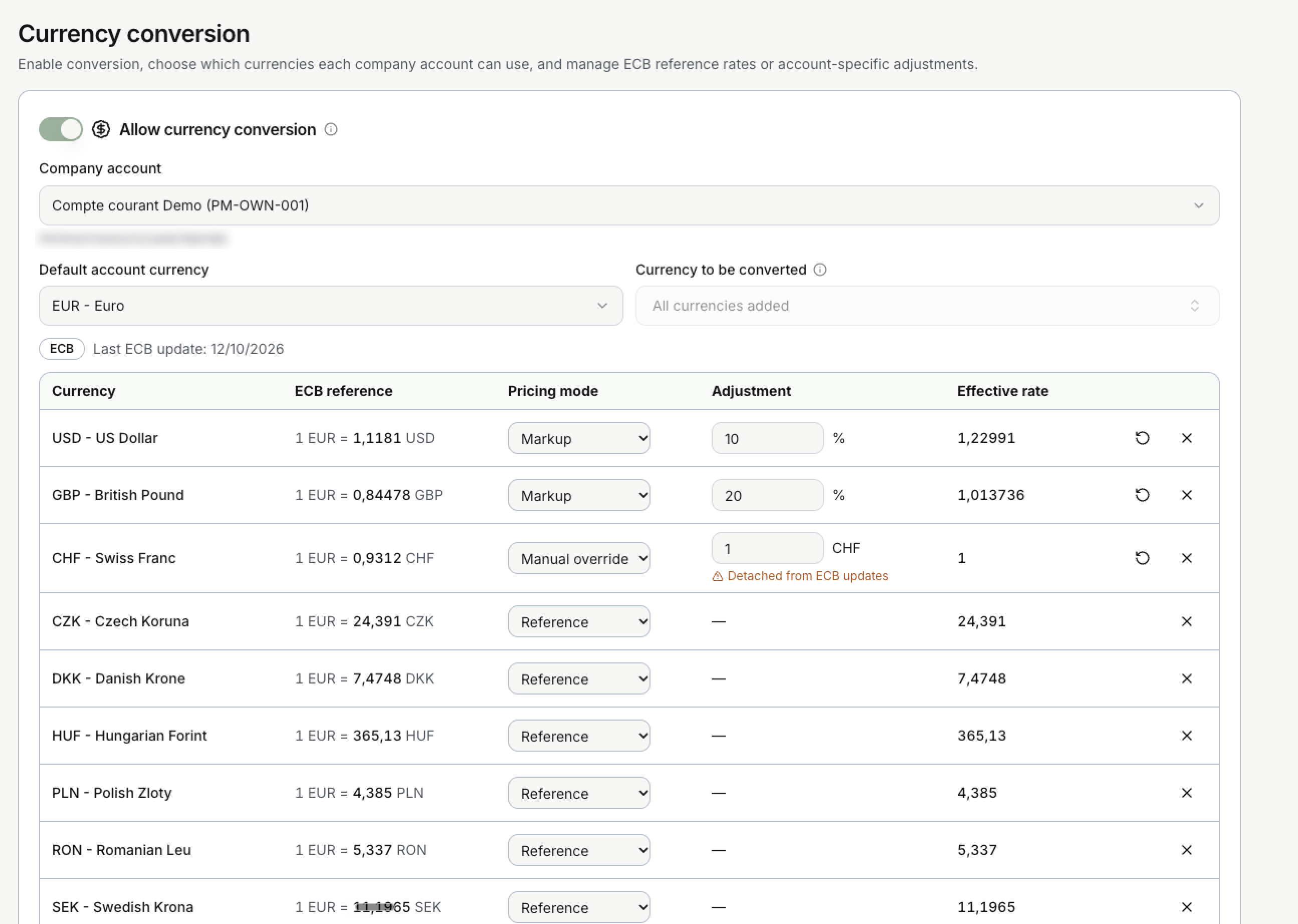
| Manual override | Uses a fixed rate that you type. It stops following the ECB and shows Detached from ECB updates. | You apply your own rate, for example a rate agreed in a contract. |
The table shows the ECB reference and the Effective rate, the one Invunion really uses. The reset icon puts a currency back on the reference, and the x removes the currency.
How a markup works
A markup is a percentage added to the rate. It is often read backwards, so keep these three points in mind:
- The rate goes up. With a 10% markup, 1 EUR = 1.1181 USD becomes 1 EUR = 1.1181 × 1.10 = 1.22991 USD. This is the Effective rate column in the screenshot above.
- Each euro now counts for more dollars, so the same invoice in dollars is worth fewer euros.
- That matches how you priced it. If you added a 10% margin when you converted your price from euros to dollars, your dollar invoice is 10% higher than the market rate says. Invunion expects the euros you originally priced, not the euros the ECB rate would give.
Example: a margin on a US dollar invoice
Your bank account is in EUR. You priced a service at 1,000 EUR and invoiced it in dollars with a 10% margin over the ECB rate, which is 1 EUR = 1.1181 USD. The invoice is 1,000 × 1.1181 × 1.10 = 1,229.91 USD. The customer pays 1,000.00 EUR into your account.
| Pricing mode | Effective rate | Amount Invunion expects in EUR | Result |
|---|---|---|---|
| Reference | 1.1181 | 1,229.91 ÷ 1.1181 = 1,100.00 | The payment looks 100 EUR short. |
| Markup of 10% | 1.22991 | 1,229.91 ÷ 1.22991 = 1,000.00 | The payment matches the invoice. |
Without the markup, Invunion would value the invoice at 1,100.00 EUR and think the customer underpaid. With the markup, it uses the same rate as your price list and sees a full payment.
If you want Invunion to expect more
A markup cannot make Invunion expect more euros. If you want it to expect more than the ECB rate gives, for example because you take a percentage on top, use Manual override with a rate lower than the ECB rate. For a 10% margin, 1.1181 ÷ 1.10 = 1.016455. Invunion then expects 1,118.10 ÷ 1.016455 = 1,100.00 EUR for a 1,118.10 USD invoice, instead of 1,000.00. A manual rate no longer follows the ECB, so update it when your price list changes.
The ECB rate is indicative, not a price you can trade at. The difference with the reference is kept for information. It is not posted as an exchange gain or loss.
Limits to keep in mind
- The account currency can be corrected only if it stays consistent with the transactions already retrieved for that account.
- Customer wallet balances are never netted across currencies.
- Payments received through an aggregator that has not resolved the original currency are not supported.
- Reference rates do not replace your bank’s rate or your accounting policy.
Updated · View as Markdown