Browse documentation
API keys
Developer > Integrations > API Key. An API key lets your own systems call Invunion for one Entity. The page lists the keys of the current Entity and lets you create or revoke them. A key works for the Entity where you created it and for no other.
Everything a developer needs to know is in the API documentation: how to authenticate with a key, and every endpoint with its parameters and examples. This page covers only what you do on the screens in the app.
Create a key
Select Create a key. The New API key dialog opens.
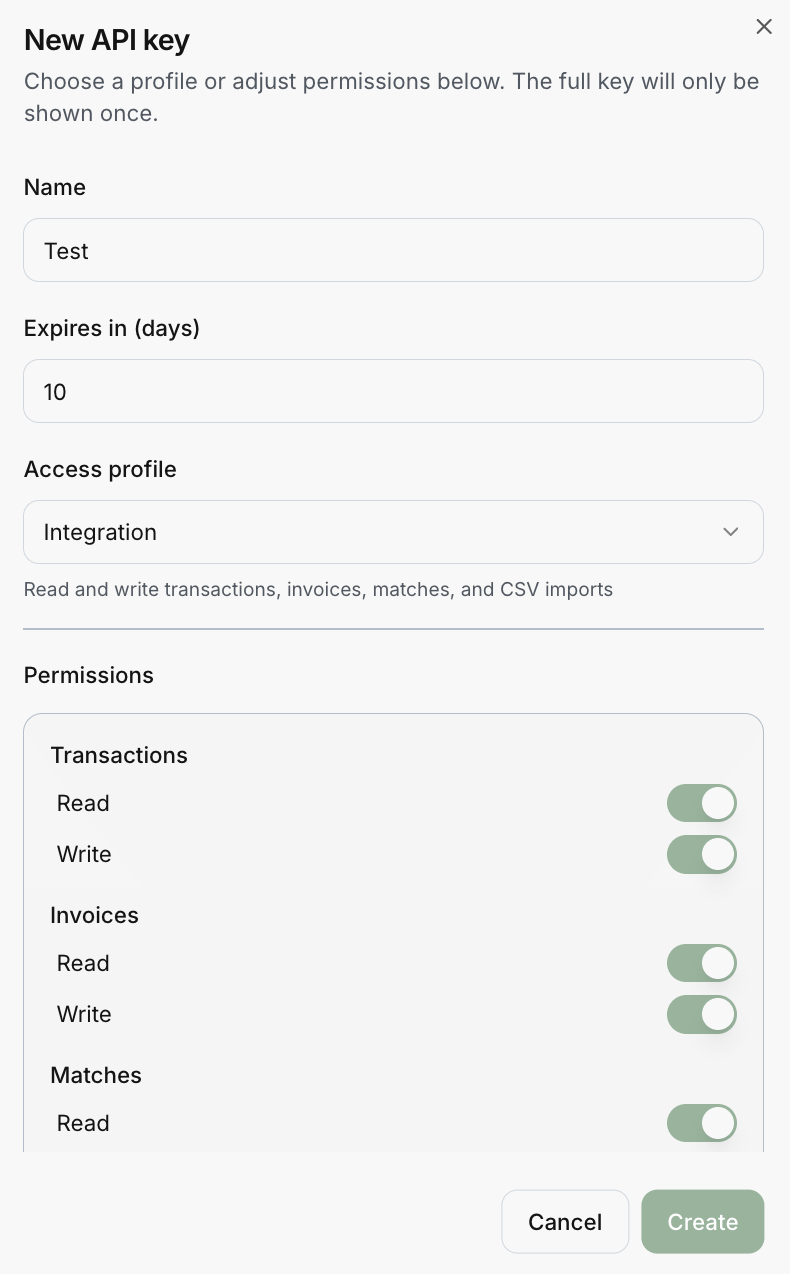
- Give the key a name.
- Optionally enter Expires in (days), from 1 to 3650. Leave it empty for no expiry.
- Pick an access profile. Its description appears below it. You can adjust the permissions by hand in the list underneath.
- Select Create, then copy the key immediately. Invunion shows the full key once and stores only a hash of it.
Keys start with uk_live_. Send one in the Authorization: Bearer header.
Access profiles
| Profile | Allows |
|---|---|
| Read only | Read transactions, invoices, matches, counterparties, payment methods and events. |
| Integration | Everything in Read only, plus write transactions, invoices and matches, and CSV and API import. |
| Full data | Read and write all data resources. It never includes administration or account management. |
If you change the ticks, the profile becomes Custom. Select at least one permission. Each resource has a Read and a Write permission: transactions, invoices, matches, counterparties and payment methods. Data import has one write permission, and Events has one read permission.
Bank details has one permission, Reveal full account numbers. It is in no profile: tick it only for an integration that needs full IBANs or account numbers. Without it, the API returns them masked, and each full number a key reads is recorded in the Audit log.
In the app, ticking Write also ticks Read. In the API itself, Write does not imply Read, so a key created with only a write scope can write but not read back.
The list and revoking
The page lists the keys of the Entity and counts them, for example 3/10 active.
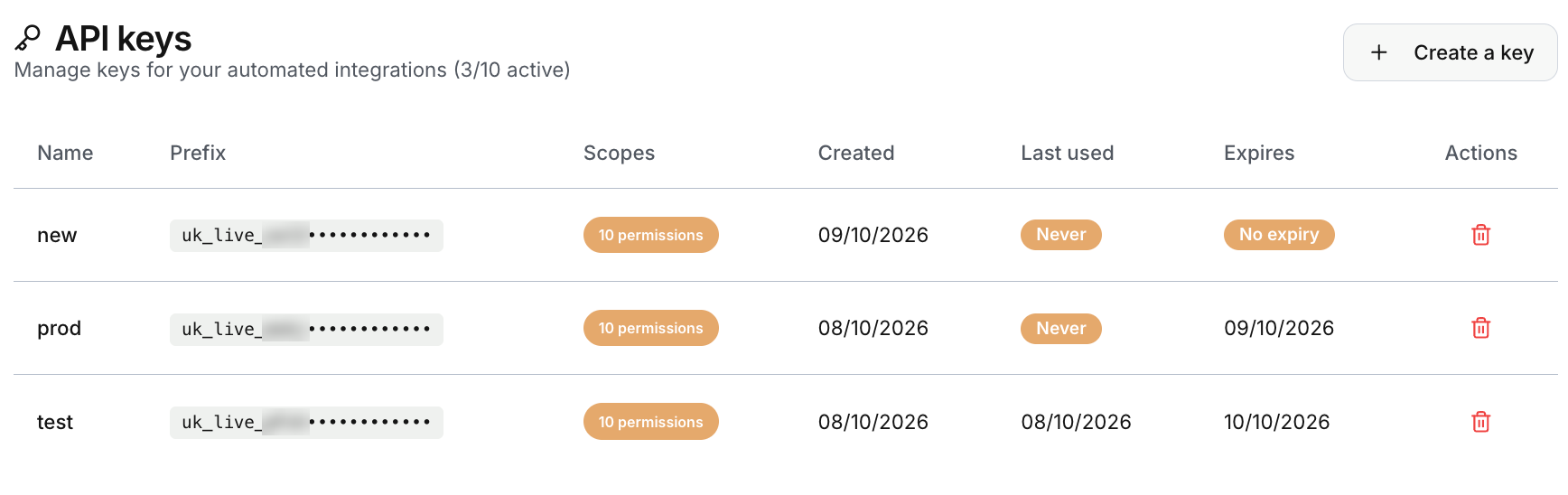
| Column | What it shows |
|---|---|
| Name | The name you gave the key. |
| Prefix | The start of the key, so you can recognise it. The rest is hidden. |
| Scopes | The number of permissions the key has. |
| Created | The date it was created. |
| Last used | The date of its last call, or Never. |
| Expires | The expiry date, or No expiry. |
The bin icon in Actions revokes the key. A revoked key stops working at once and cannot be restored, and it leaves the list. An expired key stops working too, but it stays in the list and counts toward the limit of 10 until you revoke it. To rotate a key without a gap, create the new key first, switch your system over, then revoke the old one.
Good practice
- One key per integration, named after it, so the last-used date tells you whether it is still needed.
- The smallest profile that works. A reporting tool needs Read only.
- An expiry for keys given to temporary projects.
- Keep keys in a secrets store, never in code or in tickets.
Key creation and revocation are written to the audit log, and so are the changes made with a key, with the key’s name as the actor.
Limits to keep in mind
- An Entity can have 10 active API keys.
- A lost key cannot be shown again. Create a new key.
- A key cannot change members, billing or other administration.
Updated · View as Markdown