Browse documentation
Invoice import
Developer > Import data > Invoice import. Choose which invoice formats the Entity accepts, then map each one. A mapping says which column or tag of your file is the invoice number, the date, the amount, and so on.
It applies to every import of that format: from the app, from the API, and from the SFTP inbox. You map once, then every later file is read the same way.
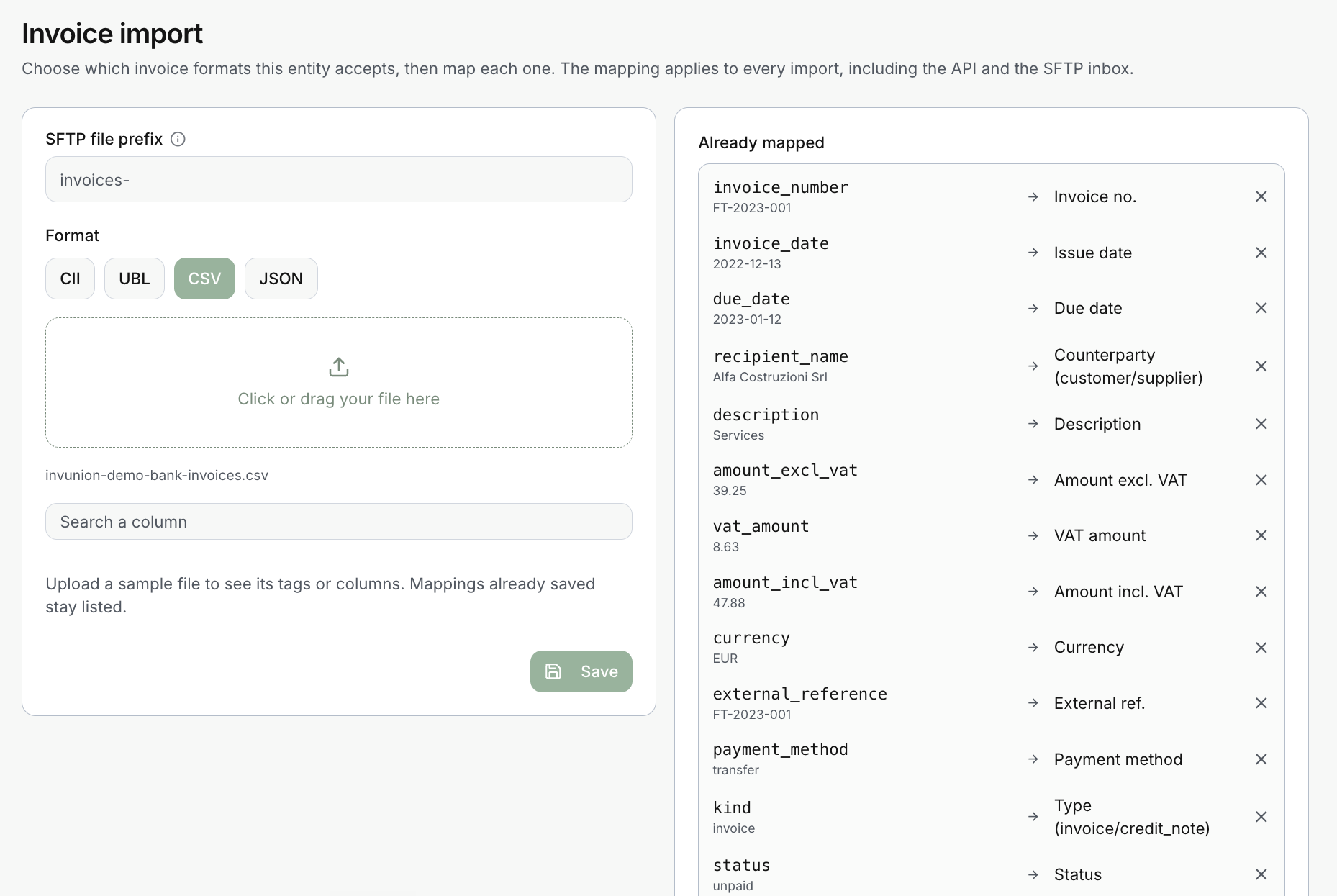
Map a format
- Choose the Format: CII, UBL, CSV or JSON.
- Drop a sample file in the upload zone, or click to choose one. Invunion lists its columns or tags.
- Link each column or tag to an Invunion field. Use Search a column to find one in a long list.
- Select Save.
Mappings you already saved stay listed on the right, under Already mapped. Each line shows the column of your file, a sample value, and the Invunion field it feeds. Select the X to remove a line.
The invoice fields
| Invunion field | What it holds |
|---|---|
| Invoice no. | The invoice number. |
| Issue date | The date the invoice was issued. |
| Due date | The date payment is due. |
| Counterparty (customer/supplier) | Who the invoice is for. See below. |
| Description | A free text. |
| Amount excl. VAT, VAT amount, Amount incl. VAT | The three amounts of the invoice. |
| Currency | The currency code, such as EUR. |
| External ref. | The invoice’s own reference in your system. |
| Payment method | For example transfer. |
| Type (invoice/credit_note) | Whether the line is an invoice or a credit note. |
| Status | For example unpaid. |
For CSV and JSON, map your own columns to these fields. For UBL and CII, the standard fields are already mapped, so you only add the extra ones.
Find the counterparty
Invunion needs to know who each invoice is for. Map one of these, and it finds the counterparty or creates it:
- a customer code,
- a counterparty external reference,
- a VAT number,
- or a name, as in the example above.
The invoice’s own External ref. is not a counterparty key. It identifies the invoice, not who it is for.
Extra tags in UBL and CII
Upload a sample invoice to see all its tags. Map an extra tag to an invoice field, or to a metadata key of your choice. A metadata key has 1 to 64 letters, digits, dots, underscores or hyphens. Invunion rejects an XML file that is neither UBL nor CII, and a ZIP without XML files.
SFTP file prefix
The SFTP file prefix limits which files of the SFTP inbox are read as invoices. In the example the prefix is invoices-, so invoices-2026-10.csv is imported and export.csv is not. Leave it empty to read every file. See Automatic statements for how files arrive.
Limits to keep in mind
- Excel workbooks and PDF invoices are not accepted. Export to CSV first.
- A mapping applies to one format. CSV and JSON need their own.
- A sandbox Entity is the safest place to try a new mapping.
Updated · View as Markdown