Browse documentation
Transaction import
Developer > Import data > Transaction import. Save a CSV, JSON or CAMT mapping on each company account. The mapping tells Invunion how to read the statement files of that account.
Manual import and the statement inbox (see Automatic statements) both use it. You set it once per account.
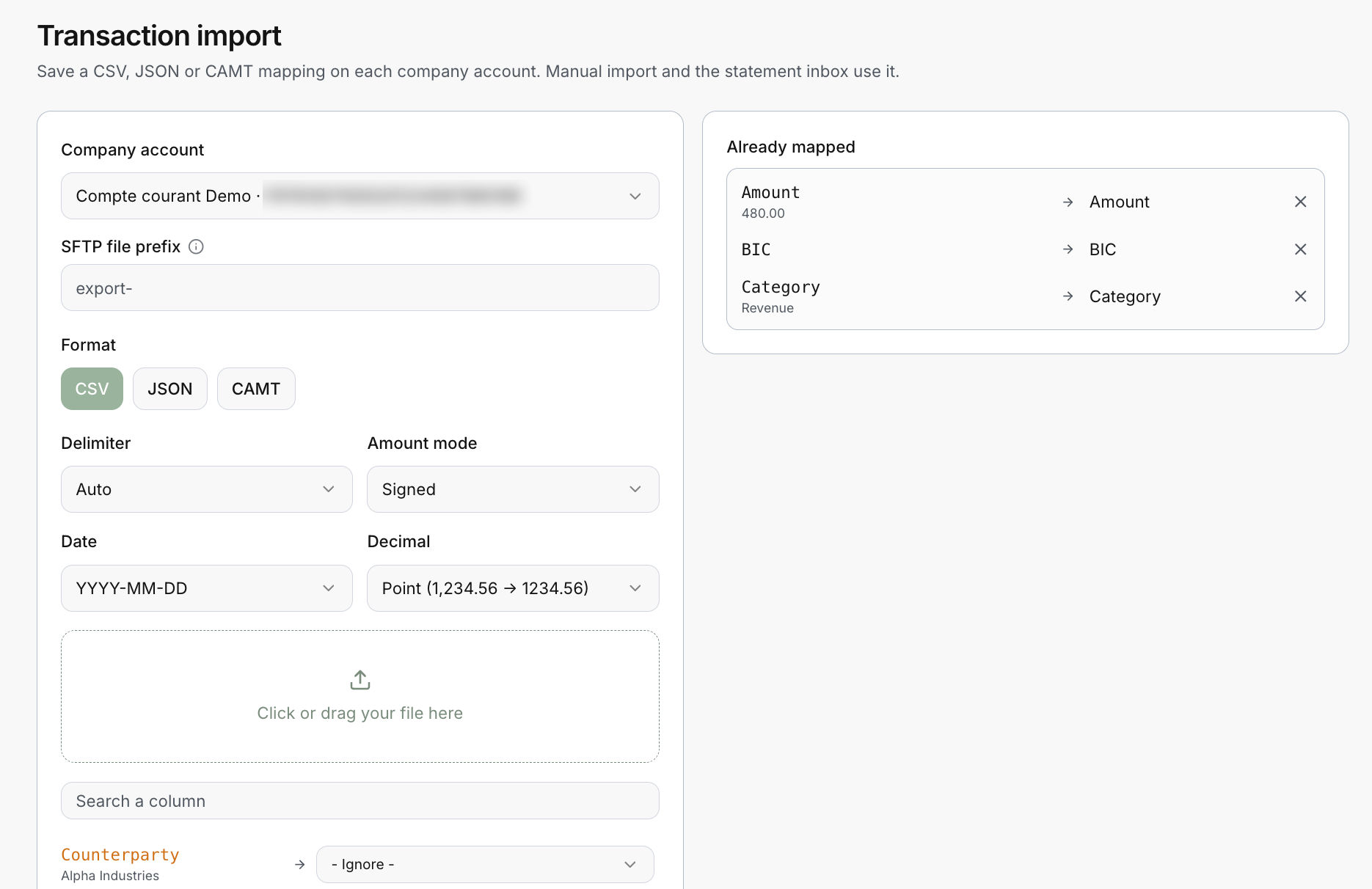
Set up a mapping
- Choose the Company account the file belongs to.
- Choose the Format: CSV, JSON or CAMT.
- Set the file settings below.
- Drop a sample file. Invunion lists its columns.
- Link each column to an Invunion field, or leave it on - Ignore -.
- Save.
You need a company account first. The selector lists your accounts with their account number.
File settings
| Setting | What it does |
|---|---|
| SFTP file prefix | Statement files whose name starts with it go to this account. |
| Delimiter | The separator of a CSV file. Auto lets Invunion detect it. |
| Amount mode | How the amount is written, see below. |
| Date | The order of day, month and year in your file, such as YYYY-MM-DD. |
| Decimal | Point (1,234.56 is read as 1234.56) or comma. |
Amounts can be in standard units or in cents, depending on how your bank exports them.
Amount mode
| Mode | How the file is read |
|---|---|
| Signed (single column) | One column. A positive amount is incoming, a negative one is outgoing. |
| Amount + indicator | One column without sign, plus an indicator column. CRDT is incoming and DBIT is outgoing. |
| Separate debit/credit columns | One column for debits and one for credits. |
Map the columns
After the upload, each column of your file appears with a sample value, for example a counterparty name. Pick the Invunion field it feeds, or - Ignore - to leave it out. Use Search a column to find one quickly.
The lines you saved stay on the right, under Already mapped. In the example, the amount, the BIC and the category are mapped. Select the X to remove one.
CAMT, MT940 and BAI2
A bank statement in camt.052, camt.053, camt.054, MT940 or BAI2 follows a standard layout, so you choose CAMT instead of mapping columns one by one. Files with the extension .xml, .sta, .mt940, .bai, .bai2 or .txt, or a .zip of them, are read.
BAI2 files from US banks
BAI2 is the statement format of US banks. One BAI2 file can hold several accounts: each transaction goes to the company account whose Identifier is the account number shown in the file. Enter that number on your company account exactly as the bank writes it, leading zeros included.
- Credits and debits. Invunion reads the direction from the BAI2 type code. Lines with a loan code (700 to 799) or a code your bank defined itself (900 to 999) have no standard direction and are not imported.
- Who paid. For ACH payments and wires, Invunion reads the payer’s name, and their routing number and account number when the bank sends them, from the transaction text. The account then finds the payment method like any US bank account.
- References. The whole transaction text is kept as remittance, so an invoice number cited in it is used for matching.
- No duplicates. The same line in an intraday file and in the next prior-day file is imported once.
Which account gets a file
When files arrive by SFTP, Invunion looks at the SFTP file prefix. If no prefix matches, the file goes to an account only when exactly one account has a mapping for that format. Give each account its own prefix to avoid mistakes.
What you see while importing
Before an import runs, Invunion checks the file and warns about:
- rows without a valid date or amount,
- unknown credit or debit values,
- duplicate source identifiers,
- counterparties that are missing,
- mixed currencies,
- dates in the future or in the distant past.
If more than 20% of the rows are skipped, Invunion flags it so you can correct the mapping.
Limits to keep in mind
- Excel workbooks and PDF statements are not accepted. Export to CSV first.
- One mapping is saved per account and format. Change it here, and later files follow it.
- A sandbox Entity is the safest place to try a new mapping.
- Import payloads are emptied once a job completes, and job rows are deleted after 30 days.
Updated · View as Markdown