Browse documentation
Payer scoring
Settings > Finance > Payer scoring. Payer scoring tells you which customers pay well and which ones to watch.
What it does
Invunion gives every customer a score from 0 to 100 and a label.
| Label | Meaning |
|---|---|
| Good | Pays on time. |
| Watch | Pays late sometimes, or has some overdue billing. Keep an eye on it. |
| Risky | Pays late or leaves a lot of billing overdue. |
The score appears on each customer in the Counterparties list, where you can sort by it. It is built from your issued invoices over the last 12 months. It is a decision aid, not a credit rating.
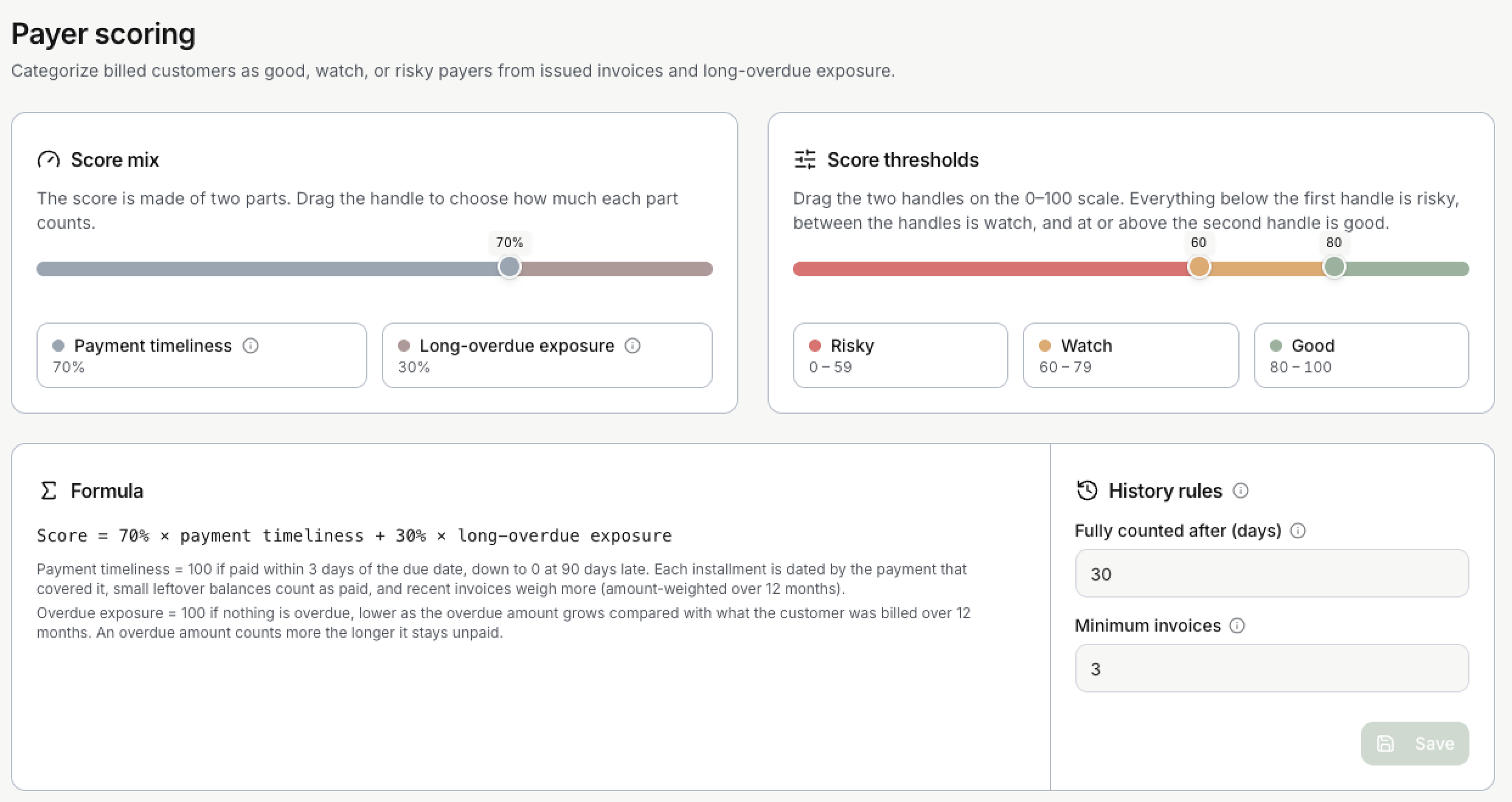
How the score is made
The score has two parts, each between 0 and 100:
- Payment timeliness: how late the customer pays. An invoice paid on time, or within 3 days of the due date, scores 100. The score falls the later the payment is.
- Long-overdue exposure: how much of their billing is overdue. Nothing overdue scores 100, and the more is overdue, the lower the score.
Larger and more recent invoices weigh more. The Formula card shows the calculation in words, with your current settings.
What you can set
| Setting | What it does | Default |
|---|---|---|
| Score mix | A slider that decides how much each part counts. | 70% timeliness, 30% exposure |
| Score thresholds | Two handles on the 0 to 100 scale. Below the first is Risky, between them is Watch, and at or above the second is Good. | Risky 0 to 59, Watch 60 to 79, Good 80 to 100 |
| Fully counted after (days) | How many days an unpaid invoice stays overdue before it counts fully in the exposure. | 30 |
| Minimum invoices | How many invoices a customer needs in the last 12 months to get a score. | 3 |
Select Save to apply your changes. Every score is then recalculated.
When scores update
Scores are recalculated when invoices, matches, installments, adjustments or credit notes change, and once a day.
Limits to keep in mind
- A customer with fewer invoices than the minimum has no score.
- Incoming payments that are not matched yet can make a customer look worse than they are. Match them first.
- Only issued invoices are used. Supplier invoices are out of scope.
Updated · View as Markdown