Browse documentation
Match levels
Settings > Administration > Rules. Match levels are the result of our matching engine. Every possible pair of one bank line and one invoice gets one level. The level decides what happens next.
| Level | In short | Result |
|---|---|---|
| Certain | The bank line cites the invoice | Confirmed |
| Strong | Exact amount from the right payer | Confirmed if it is the only Strong invoice for that line |
| Possible | Worth a look, not proof | Waits in the Match inbox |
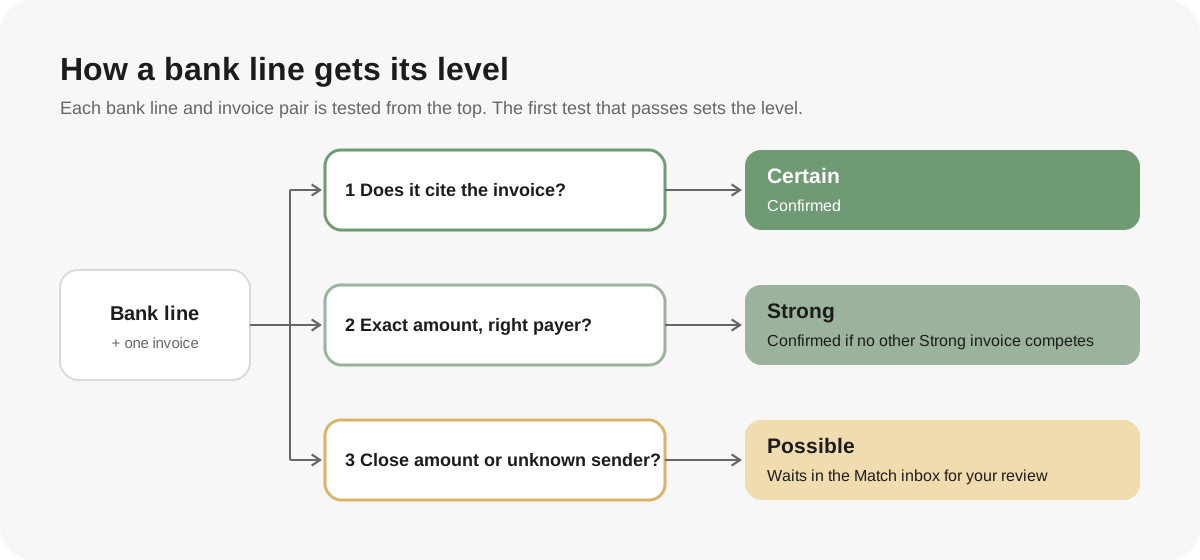
Every Entity uses the same three levels. There is no score to tune: you change the settings below, and the levels follow. The date never decides a level. It only puts the suggestions inside one level in order.
What each level means
Certain
The bank line cites the invoice number or the invoice external reference. A payment of any amount can be Certain, a partial payment included. See Invoice reference for how Invunion reads the bank line.
Strong
The amount is exactly the Amount due of the invoice, or the next open installment, and it comes from the right payer. See Who is the right payer.
A Strong pair is confirmed when no other invoice competes: it is the only Strong invoice for that bank line, and no Certain invoice exists for the line. Otherwise it waits in the Match inbox.
A bank line that cites an invoice but comes from another customer is Strong too, while Trust a cited invoice paid by another customer is on.
Possible
The pair is worth a look, but it proves little. It waits in the Match inbox for you. A pair is Possible when:
- the right payer sends an amount within 15% of the amount due;
- the sender is unknown, and the amount is exact;
- the bank line cites the invoice, but the payment is more than 15% above the amount due, which often means one payment for several invoices;
- the bank line cites the invoice from another customer, while Trust a cited invoice paid by another customer is off.
Any other pair is not proposed.
Who is the right payer
Invunion reads the sender of the bank line from its counterparty, or from the owner of its payment method when the line has no counterparty yet. Then it compares the sender with the invoice:
| Sender | Result |
|---|---|
| The customer of the invoice | Right payer. A customer can always settle its own invoice. |
| The Payer (if not the customer) named on the invoice | Right payer. |
| A counterparty tagged Third-party payer, when the invoice names no payer | Right payer. |
| Another third-party payer, when the invoice names a payer | Wrong payer. |
| Any other counterparty | Wrong payer. An exact amount is not proposed. |
| No counterparty, or Unclassified | Unknown. An exact amount is Possible. |
To name a payer on an invoice, see Invoices issued. To tag a counterparty as a third-party payer, see Counterparties.
What you can set
On the Match levels card:
| Setting | What it does |
|---|---|
| Your prices | Tells Invunion whether your invoices often share the same amount. See Your prices. Default: Mixed. |
| Confirm Strong matches | On: a Strong pair is confirmed when no other invoice competes. Off: Strong pairs wait in the Match inbox. Default: on. |
| Trust a cited invoice paid by another customer | The bank line names the invoice but comes from a different customer, such as a parent company or an accountant. On: Strong. Off: Possible. Default: on. |
| Invoice reference | Which bank fields to read and which invoice fields to compare with. See Invoice reference. Default: all of them. |
Each change is saved as soon as you make it.
Your prices
An exact amount proves less when many invoices share it. Choose the option that fits how you price:
| Option | When to choose it | What happens to an exact amount |
|---|---|---|
| Mostly customized | Amounts are rarely repeated. | It counts fully. |
| Mixed | Some amounts repeat. | It counts fully when no other open invoice of your Entity has the same open amount. Otherwise it counts one level lower. |
| Mostly the same | Many invoices share the same amount, such as subscriptions. | It counts one level lower: Possible from the right payer, and not proposed from an unknown sender. |
A star marks the option Invunion suggests from your invoices of the last 12 months. It suggests Mostly the same when 60% or more of them share an amount, Mostly customized when 25% or less do, and Mixed otherwise. With fewer than 20 invoices, it suggests nothing.
A citation of the invoice (Certain) is never affected by this setting.
Invoice reference
A bank line that cites the invoice is Certain. Choose where Invunion looks:
| Setting | Options |
|---|---|
| Read from | Structured reference, External reference, Remittance, Description |
| Compare with | Invoice number, Invoice external reference |
A hit on any ticked bank field for any ticked invoice field is enough. At least one of each stays ticked.
Invunion ignores spaces, hyphens, slashes, dots and plus signs, and capital letters. FAC-2026-001, FAC 2026 001 and fac.2026.001 are the same reference. Inside a longer text, the reference must appear as a whole word, with its full length. Invunion ignores references shorter than 4 characters, and purely numeric ones shorter than 5, because they look like dates and amounts.
| Bank line text | Invoice number | Cited? |
|---|---|---|
| Description Paiement client - Alpha Industries FAC-2026-002 | FAC-2026-002 | Yes |
| Remittance VIR FAC 2026 002 ALPHA | FAC-2026-002 | Yes |
| Description Paiement FAC-2026-10 | FAC-2026-1 | No: a digit follows |
| Description Paiement 2026-002 | FAC-2026-002 | No: only a fragment |
| Description Facture 12 payée | 12 | No: too short |
Example: one invoice, five bank lines
Invoice FAC-2026-019 of Kappa Retail is for 480,00 €, and Kappa Retail is its right payer. Prices are set to Mixed, and no other open invoice has the same amount.
| Bank line | Level | What happens |
|---|---|---|
| 480,00 € from Kappa Retail | Strong | Confirmed. |
| 480,00 € from Kappa Retail, with FAC-2026-019 in the description | Certain | Confirmed. |
| 450,00 € from Kappa Retail | Possible | Waits in the Match inbox. |
| 480,00 € from a sender Invunion cannot identify | Possible | Waits in the Match inbox, with the badge Sender not identified. |
| 480,00 € from another customer, no citation | Not proposed | The sender is a wrong payer. |
What changes after you change a setting
- Next matching run and Match inbox: the new settings apply to the next matching run and to the suggestions the Match inbox shows from then on.
- Matches already made: Invunion never rewrites a confirmed match or a suggestion already stored.
- The Match inbox: each suggestion shows its level and the reasons, such as Exact amount, Paid by the customer or Amount shared with other invoices. See Dashboard metrics.
Limits to keep in mind
- The 15% band is fixed. It is not a setting.
- A bank line is confirmed against one invoice at most. If it cites several invoices, all of them wait in the Match inbox.
- Invunion does not split one payment across several invoices by itself.
- A pair you marked Not a match is not suggested again.
- The matching is rule-based. It does not use AI.
Updated · View as Markdown