Bank reconciliation
that does the matching for you.
Bring in bank lines and issued invoices. Clear matches are confirmed for you; doubtful ones wait in one inbox, with the reason why.
What Invunion reconciles
Bank reconciliation checks that your bank and your books agree. The longest part is knowing which customer payment settles which of your issued invoices, called cash application (or cash allocation in the UK). That is the part Invunion automates.
The result: you know exactly when an invoice is paid, and which transaction paid it. That clarity feeds the entire Order-to-Cash chain, from collections and dunning to customer follow-up and license activation.
Today, our scope is accounts receivable: issued invoices and their payments. It's the most critical (and most painful) link to get right.
Read the full guide: what is bank reconciliation?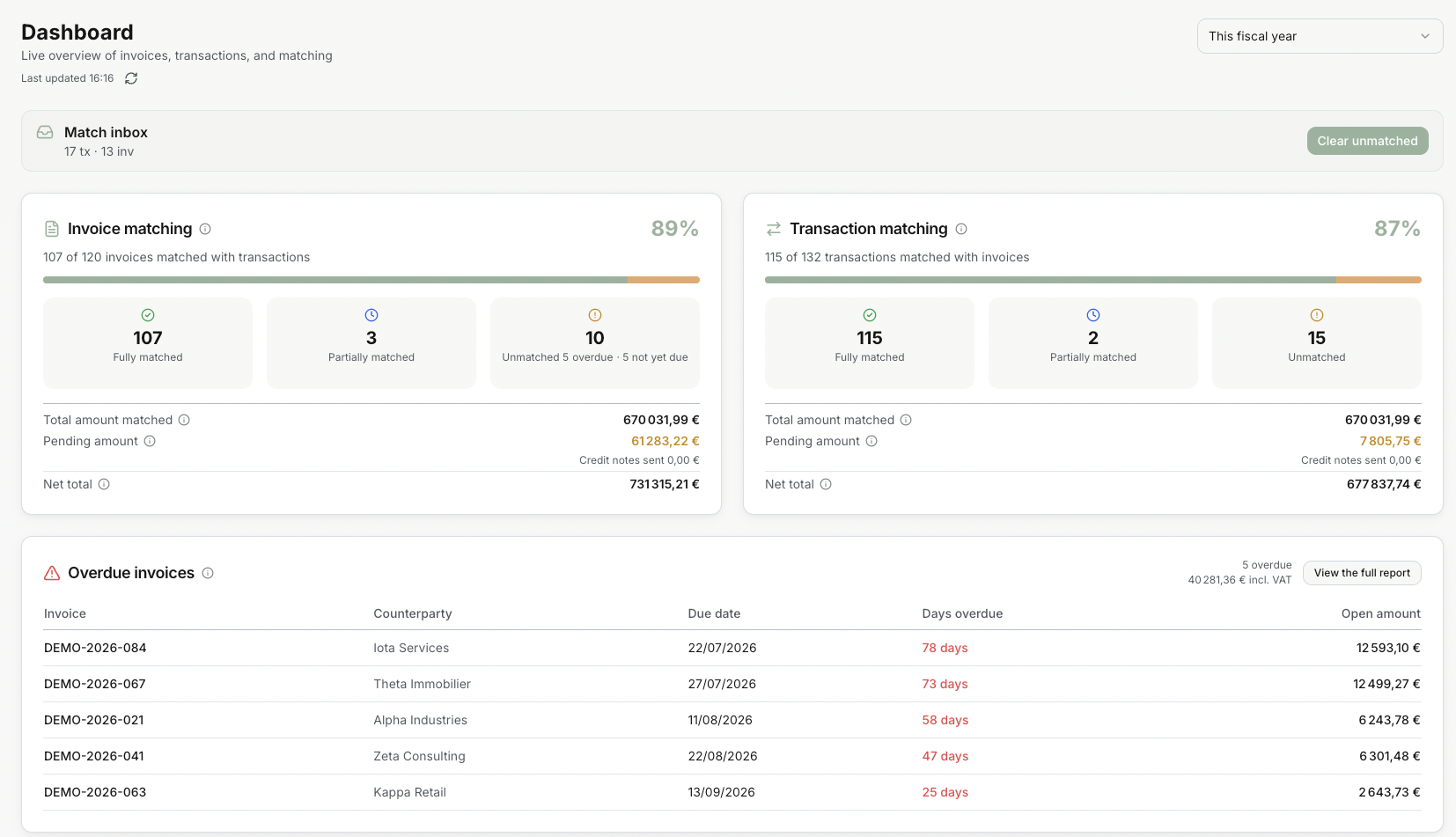
Why manual reconciliation is broken
For fast-growing companies, the manual approach creates compounding problems.
Hours of manual work every month
Finance teams spend a large part of every month matching transactions line by line across spreadsheets, bank statements and accounting systems.
Costly errors and late discoveries
Manual matching introduces human errors. Discrepancies are often discovered at month-end, causing costly corrections and delayed reporting.
E-invoices arrive daily, reconciliation happens monthly
The rapid rollout of e-invoicing generates continuous flows and structured data. Manual reconciliation cannot extract that value in time: treasury, collections, and steering need reliable, up-to-date indicators, not monthly closes.
Disconnected from Order-to-Cash
Order-to-Cash connects orders, invoicing, payments and collections. Each step depends on the one before. Manual reconciliation sits outside this flow, breaking the chain and delaying everything downstream: dunning, customer follow-up and revenue recognition.
How Invunion solves it
Everything you need to match customer payments, without babysitting a spreadsheet.
Your bank data, however it arrives
Download statements over EBICS or SFTP, import camt.053, MT940, BAI2 or CSV files, push lines through the API, or add one by hand.
AI matching engine
Each suggestion is Certain (the payment cites the invoice), Strong (the exact amount from the right payer) or Possible. Certain and Strong are confirmed; Possible waits for a person.
Exception workflow
Possible matches wait in the Match inbox. Confirm or reject each suggestion, or link the invoice yourself. A rejected pair is not proposed again.
API-first platform
Every invoice, transaction and match is available through a documented REST API and signed webhooks.
Built for your role

Accountants and finance controllers
The pain
Month-end starts with a bank export, an invoice export and a spreadsheet, matched line by line.
With Invunion
Payments that cite their invoice, or pay the exact amount from the right customer, are matched for you. You review only the doubtful ones, each with the reason it was suggested.

CFOs and finance directors
The pain
You only know which invoices are really paid after the close, too late for cash decisions.
With Invunion
See paid, partly paid and open invoices as soon as bank lines arrive, with a payer score for each customer.

CTOs and developers
The pain
Every bank speaks its own format, and finance keeps asking for one more script.
With Invunion
Bank files in any format arrive through EBICS, SFTP or upload and land as one transaction shape. Matches go out through a REST API and signed webhooks, ready for your ERP, CRM or billing system.
Revenue and customer teams
The pain
A customer says they paid, and their license stays locked until someone in finance checks the bank.
With Invunion
When an invoice is paid, Invunion sends a signed webhook or a Slack, Microsoft Teams or email notification. Your billing system can then activate the license, open access and stop the reminder on its own.

Consultants and accounting firms
The pain
Every client sends statements and invoices in a different format, and they all close in the same week.
With Invunion
Map each client's files once and the mapping is reused on every import. Clear matches are confirmed for you, so your team spends its time on the few doubtful lines and on advice. Start each client in a sandbox before going live.
For CTOs and developers
Easy file mapping
Map a statement and an invoice file onto Invunion fields once. Every source lands as the same transaction shape.
API
Create and read invoices, transactions, and matches through a documented API. Your integration calls stable business codes.
Webhooks and events
Subscribe to the moment that should move the next system: a transaction arrives, a match is confirmed, an invoice is paid. Invunion posts a signed JSON payload to your URL.
AI friendly
Records, codes, and events are structured so a model or agent can read them. The same fields the matching engine uses are available to your own tools.
Questions about how it works
Do I need to connect my bank?
No. You can import camt.053, MT940, BAI2, CSV or JSON files, receive statements over SFTP or EBICS, or push transactions through the API. A new account starts in a sandbox with sample data.
Which invoice formats does Invunion accept?
CSV, JSON, EN 16931 UBL and CII XML, or invoices created through the API. PDF and Excel invoices are not accepted.
What happens to payments Invunion is not sure about?
They get the Possible level and wait in the Match inbox. A person confirms or rejects each suggestion, or links the invoice by hand. A rejected pair is not proposed again.
Does Invunion replace my accounting software?
No. It works alongside it. There is no native connector to accounting software today; results leave Invunion through exports, the REST API and webhooks.