Browse documentation
Counterparty overview page
Select Overview in the edit panel to open the full page of a counterparty. It shows everything about it in one place.
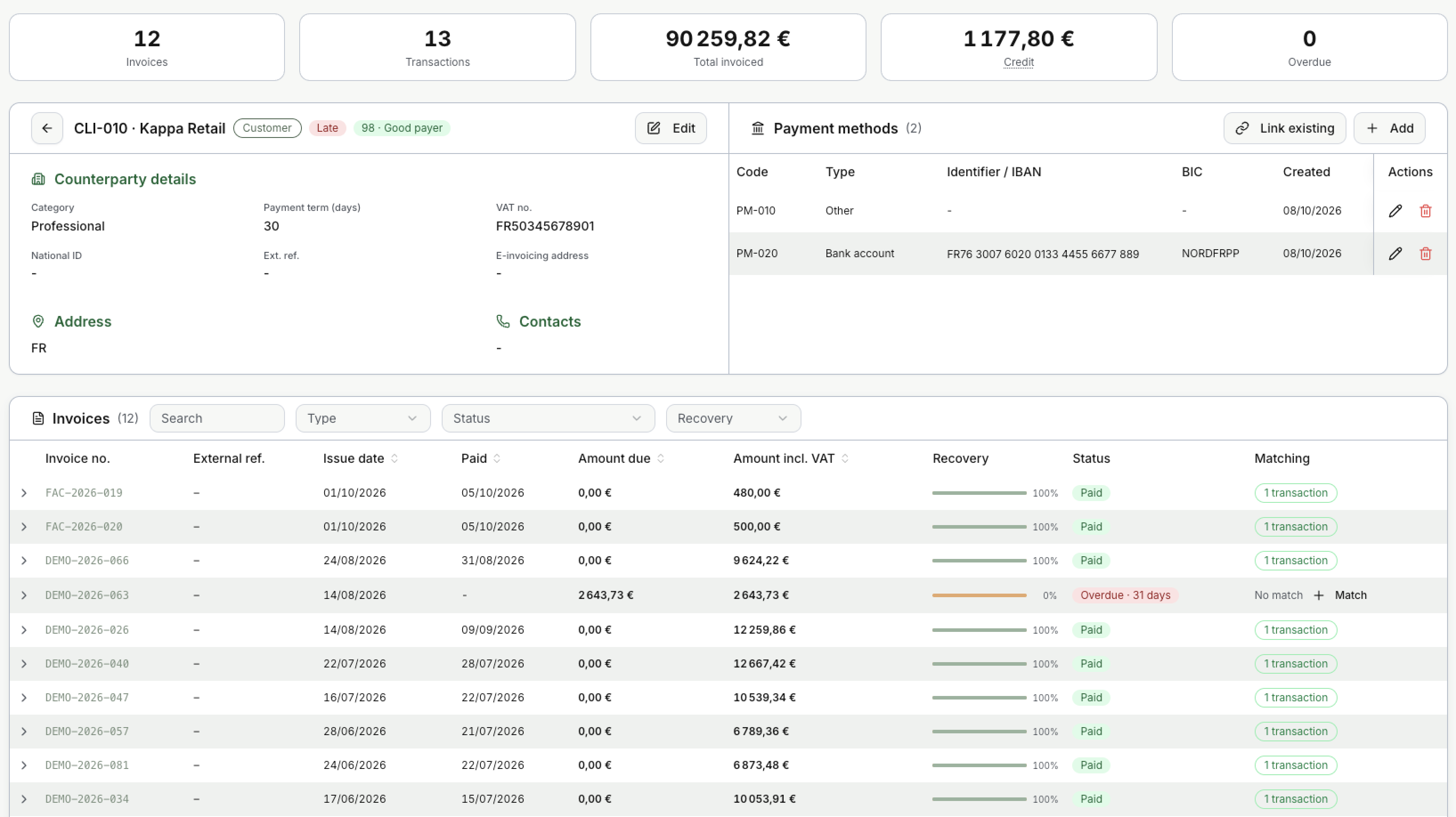
The tiles at the top
| Tile | What it shows |
|---|---|
| Invoices | How many invoices and credit notes the counterparty has. |
| Transactions | How many bank transactions are linked to it. |
| Total invoiced | The total of its invoices, per currency. |
| Credit | The customer wallet: credit notes not used yet, plus money received that is not applied to an invoice. Each currency has its own balance. |
| Overdue | How many invoices are overdue. |
When you issue a new invoice to this customer, the wallet pays it automatically, oldest credit first.
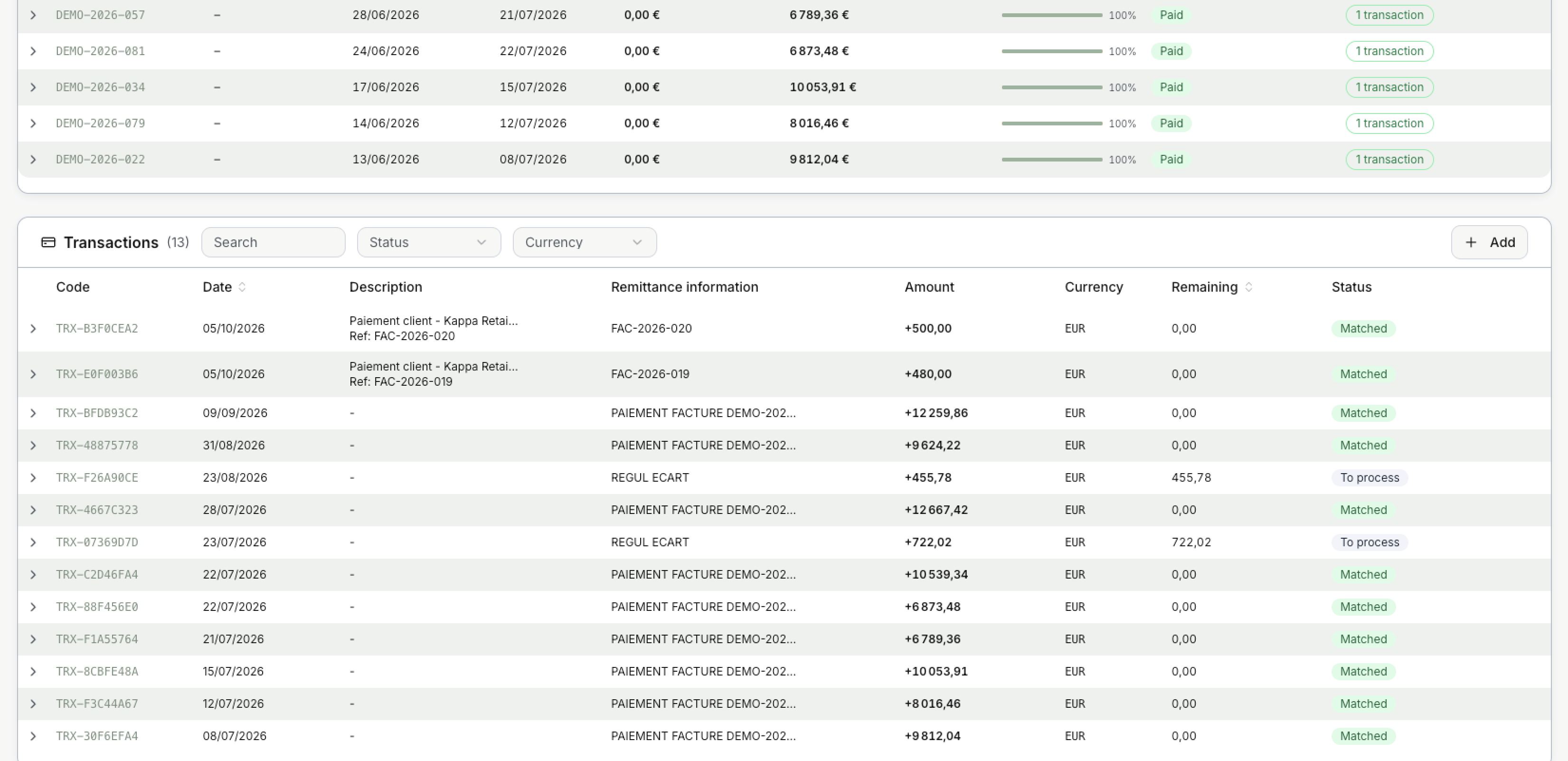
In the example, the 1,177.80 € of Credit are the two bank transactions REGUL ECART (455.78 € and 722.02 €) that are not applied to any invoice yet.
The header and details
The header repeats the code, the name, the roles, the status and the payer score. Edit opens the edit panel. The arrow takes you back to the list.
Below it, Counterparty details, Address and Contacts show what was entered in the edit panel.
Payment methods
The payment methods of the counterparty: code, type, IBAN or other identifier, BIC and creation date.
- Add creates a new payment method for this counterparty.
- Link existing attaches a payment method that has no counterparty yet.
- Select to edit a payment method, or to delete it.
In the example, PM-010 is the Default payment method created with the counterparty, and PM-020 is its bank account.
Invoices
Every invoice and credit note of the counterparty. Filter by Type, Status and Recovery, or search.
| Column | What it shows |
|---|---|
| Paid | The date of the last payment. |
| Amount due | What is still to be paid. |
| Recovery | A bar with how much of the invoice is paid, from 0% to 100%. |
| Status | For example Paid or Overdue · 31 days. |
| Matching | How many transactions pay the invoice, or No match with a Match button. |
Select the arrow at the start of a line to see the linked transactions.

Each linked transaction shows its code, amount, date and description, and how the match was made: rule (by a rule), manual (by a person) or ai_auto (confirmed automatically from its match level). Edit Match changes it.
Transactions
Every bank transaction linked to the counterparty. Filter by Status and Currency, or search. Add creates a transaction by hand.
| Column | What it shows |
|---|---|
| Remittance information | The text sent with the payment. It often holds the invoice number. |
| Remaining | The part of the amount not yet applied to an invoice. |
| Status | Matched when the full amount is applied, To process when nothing is applied yet. |
In the example, invoice DEMO-2026-063 is overdue while two payments are still To process. This is the first place to look before chasing the customer.
Updated · View as Markdown