Use cases
Simple or complex billing.
Always know what is paid.
Invunion matches your customers' payments to the invoices you issued. Here is what that looks like in five common situations.
You don't need complex billing to use it
When it is simple
You just want to know when you are paid, and for what.
- Clear matches are confirmed for you.
- Each invoice shows as paid, partially paid or overdue.
- Your team is told when an invoice is paid.
When it gets complex
Your billing has many moving parts.
- Several companies, product lines and currencies.
- Grouped payments, partial payments and credit notes.
- Customers paid for by a parent company or a third party.
Use cases
-
01
Know the moment an invoice is paid
A payment on one side, an invoice on the other. Invunion links them and tells your team.
Read the guide -
02
One transfer for several invoices
One payment of €300 for three invoices of €100. Invunion finds the three.
Read the guide -
03
A parent company or a third party pays
The parent company pays, the invoice is in the customer's name. Invunion knows they are linked.
Read the guide -
04
One invoice paid by several companies
Three companies each pay a share of the same invoice. Invunion links the three payments to it.
Read the guide -
05
Accounting firms with many clients
Even a complex invoice stays clear: a credit note and two payments, each one linked to the invoice, down to nothing left to pay.
Read the guide
The teams who use it
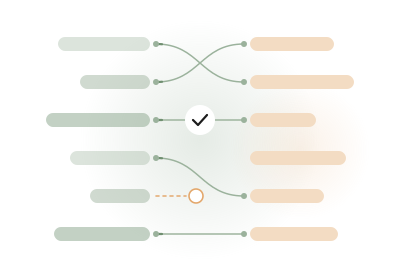
Finance, tech and revenue teams all ask the same question: has this invoice been paid?
Accountants and finance controllers
The pain
Month-end starts with a bank export, an invoice export and a spreadsheet, matched line by line.
With Invunion
Payments that cite their invoice, or pay the exact amount from the right customer, are matched for you. You review only the doubtful ones, each with the reason it was suggested.

CFOs and finance directors
The pain
You only know which invoices are really paid after the close, too late for cash decisions.
With Invunion
See paid, partly paid and open invoices as soon as bank lines arrive, with a payer score for each customer.
Revenue and customer teams
The pain
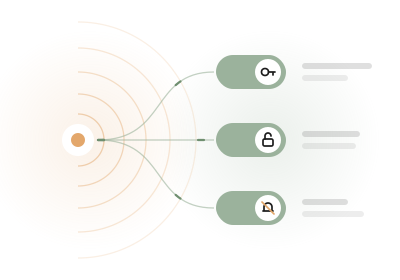
A customer says they paid, and their license stays locked until someone in finance checks the bank.
With Invunion
When an invoice is paid, Invunion sends a signed webhook or a Slack, Microsoft Teams or email notification. Your billing system can then activate the license, open access and stop the reminder on its own.

Consultants and accounting firms
The pain
You match incoming payments for dozens of clients, each with its own bank, formats and habits. This production work takes time and is hard to bill.
With Invunion
Clear matches are confirmed automatically, and your team handles only the exceptions. You give your clients an up-to-date view of their collections all year round, not just at closing, and you spend the time saved on advice.
For CTOs and developers
- 01
Easy file mapping
Map a statement and an invoice file onto Invunion fields once. Every source lands as the same transaction shape.
- 02
API
Create and read invoices, transactions, and matches through a documented API. Your integration calls stable business codes.
- 03
Webhooks and events
Subscribe to the moment that should move the next system: a transaction arrives, a match is confirmed, an invoice is paid. Invunion posts a signed JSON payload to your URL.
- 04
AI friendly
Records, codes, and events are structured so a model or agent can read them. The same fields the matching engine uses are available to your own tools.
{
  "id": "7b5deb4d-3b7d-4bad-9bdd-2b0d7b3dcb6d",
  "type": "invoice.settled",
  "created_at": "2026-09-28T10:00:03.000Z",
  "data": {
    "invoice": { ... },
    "previous": {
      "status": "partial",
      "total": "160.00",
      "paid": "60.00",
      "open": "100.00"
    },
    "allocations": [ ... ]
  }
}
Know when you are paid, and for what.
Tell us how you invoice and how your customers pay. We will tell you plainly whether Invunion fits.