# Webhooks
> A webhook endpoint receives a signed JSON event whenever something happens in Invunion, such as a transaction arriving, a match being confirmed, or an invoice being paid. Add up to five endpoints, choose the events and alerts for each, verify the signature, send a test, and use the delivery log to see failures and resend.
Source: https://www.invunion.com/knowledge-base/webhooks/
Last updated: 2026-10-22
**Developer > Integrations > Webhook.** A webhook lets Invunion call your systems when something happens, such as a transaction arriving or an invoice being paid. You add an endpoint, choose the events, and Invunion sends each one as a signed JSON request.
Everything a developer needs to know is in the [API documentation](https://www.invunion.com/knowledge-base/api/introduction/). Its last section, the [webhooks reference](https://www.invunion.com/knowledge-base/api/webhooks/), has the event payloads, the signature code and the events API. This page covers only what you do on the screens in the app.
The page has two parts: the **Webhook endpoints** at the top, and the **Delivery log** below.
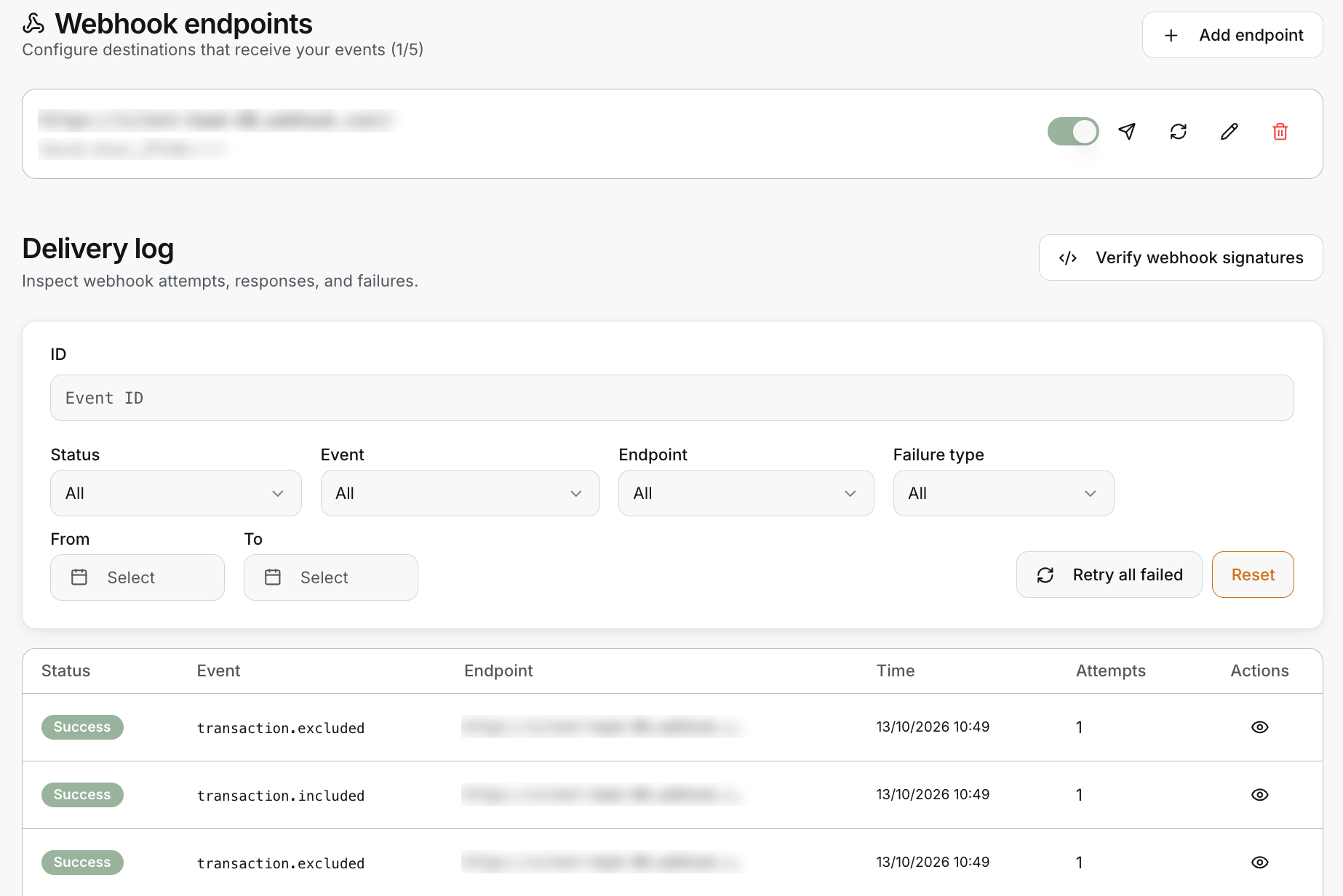 Each endpoint is one card. It shows its URL, the start of its signing secret, and a switch to turn it on or off. The four icons on the right **send a test**, **rotate the secret**, **edit** and **delete**. The title counts your endpoints, for example **1/5**.
## Add an endpoint
Select **Add endpoint**. The same form opens to edit an existing endpoint.
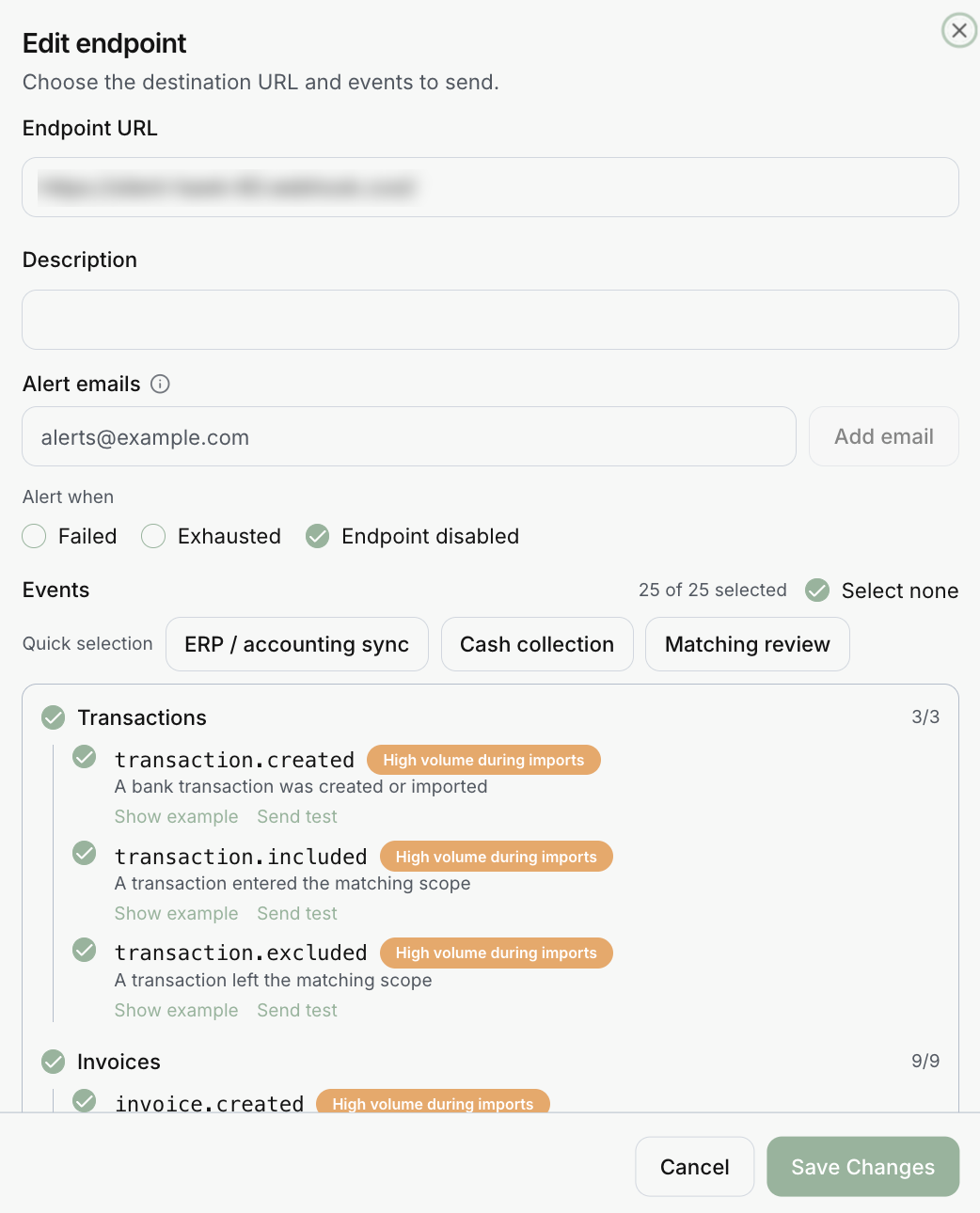 | Field | What it does |
| --- | --- |
| **Endpoint URL** | Where Invunion sends the events. It must be HTTPS and a public host. A private or invalid address is rejected. |
| **Description** | Optional, for your own reference. |
| **Alert emails** | Up to five addresses that Invunion emails when a delivery reaches a status you select. |
| **Alert when** | The statuses that trigger an alert email: **Failed**, **Exhausted** and **Endpoint disabled**. Only **Endpoint disabled** is selected by default. |
| **Events** | The events to send, grouped by category. Pick at least one. The counter shows how many are selected. |
An Entity can have up to five endpoints, active or inactive. Switch one to inactive to pause it without deleting it.
## Choose the events
Use **Select all** or **Select none**, or start from a **Quick selection**:
| Quick selection | Selects |
| --- | --- |
| **ERP / accounting sync** | All invoice and counterparty events. |
| **Cash collection** | Invoice settlement changed and invoice settled. |
| **Matching review** | All match events. |
Each event shows what it means, a **Show example** link for a sample payload, and **Send test**. A few events carry a **High volume during imports** badge, because an import can create hundreds. Subscribe to them only if you need every record.
| Category | Events |
| --- | --- |
| Transactions | created, included, excluded |
| Invoices | created, updated, settlement changed, settled |
| Matching | created, suggested, confirmed, rejected, cancelled |
| Counterparties | created, updated, deleted, bank account linked |
| Banking | bank connected, bank disconnected |
| Synchronization | completed, failed |
The two settlement events cover invoices and credit notes alike:
- **Settlement changed** is sent each time a payment, credit note, refund or adjustment is added to or removed from a document, so every installment and every undone match sends one.
- **Settled** is sent when nothing is left to pay, whatever mix of payments and credit notes settled it.
They replace the former *paid*, *partially paid*, *fully credited*, *partially credited*, *mixed settlement*, *credit note applied* and *credit note refunded* events. An endpoint that was subscribed to any of those now receives both new events. The [webhooks reference](https://www.invunion.com/knowledge-base/api/webhooks/) explains their payload.
## Signing secret
When you create an endpoint, Invunion shows its **signing secret** once. Copy it and confirm that you saved it. It cannot be shown again. **Rotate secret** creates a new one, and the old one stops working immediately, so update your receiver first, or at the same time.
Each request carries an `x-invunion-signature` header made from a timestamp and an HMAC of the exact raw body. Verify it before you parse the JSON, and reject a timestamp more than five minutes old.
## Receive events
- Answer with a `2xx` promptly. Each request has a 10 second limit and redirects are not followed. Do the heavy work afterwards.
- Delivery is at least once. Use the event `id` to ignore duplicates.
- The `sequence` number increases per Entity. Use it with the events API to catch up after an outage of your receiver. Events stay available for at least 45 days.
- Optional batching sends up to 100 events in one request.
## Test
- **Send test** on an endpoint sends a `webhook.test` event.
- **Send test** next to an event sends a realistic example of that event, marked `"test": true`. It is never mixed with real data.
## Delivery log
The **Delivery log** shows every attempt. Filter it by event ID, status, event, endpoint, failure type and dates, then select **Reset** to clear the filters. The eye icon opens a row, with the request payload, the response and the attempts. **Retry all failed** queues every failed delivery again, and **Verify webhook signatures** shows how to check the signature of a request.
| Status | Meaning |
| --- | --- |
| Pending, Delivering | Waiting or in progress. |
| Success | Your endpoint answered `2xx`. |
| Failed | Will be retried. |
| Exhausted | All attempts used. **Resend webhook** to try again. |
| Failure type | What to do |
| --- | --- |
| Rate limited | Your receiver answered 429 or 503. Delivery pauses and retries by itself. |
| Rejected | Your receiver answered 4xx. Check the URL and how it reads the payload. |
| Timeout | No answer within 10 seconds. Acknowledge fast and process later. |
| Invalid URL | The address is not allowed. |
Failed deliveries are retried after about 1 minute, 5 minutes, 30 minutes, 2 hours and 6 hours. Invunion sends at most 5 requests at once to an endpoint. Finished deliveries are kept for 30 days. An endpoint that keeps failing for days can be disabled automatically.
## Limits to keep in mind
- An Entity can have 5 webhook endpoints, active or inactive.
- A lost signing secret cannot be shown again. Rotate the secret.
- Payment methods do not send events, and neither do the default system counterparties.
- An event is recorded only while an active endpoint or [notification rule](https://www.invunion.com/knowledge-base/notifications/) is subscribed to its type. A new endpoint does not replay the past.