# Payment methods
> A payment method is how money moves: a bank account, a card, PayPal, Wero, Twint or a crypto wallet. Invunion uses its IBAN, account number or identifier to know who paid. Account numbers are stored encrypted and shown masked. This page covers the list, ownership, adding a method, accounts without an IBAN, and account number protection.
Source: https://www.invunion.com/knowledge-base/payment-methods/
Last updated: 2026-10-22
**Payment methods** in the menu. A payment method is **how money moves**: a bank account, a card, PayPal, Wero, Twint, a crypto wallet.
When a bank line arrives, Invunion reads its IBAN, account number or identifier and looks for the payment method. If it finds one, it knows **who paid**.
## How payment methods work
Each payment method has three things:
1. **What it is**: a type, and an IBAN, a domestic account number (UK, US, Canada) or another identifier, such as a PayPal email.
2. **Who owns it**: a customer, or your own company.
3. **How many owners**: one counterparty (**Exclusive**) or several (**Shared**).
## The Payment methods list
Each line is one payment method. The buttons at the top:
| Button | What it does |
| --- | --- |
| **Add** | Create one payment method by hand. |
| **Import** | Create many at once from a CSV file. |
| **Export** | Download the list. |
| **Columns** | Show or hide columns. |
Tick the circle at the start of a line to select it.
**Search** looks in the name, code, IBAN and identifier. Because account numbers are encrypted, search for one with the **whole** IBAN or account number, or with its **last four** characters: a fragment from the middle finds nothing. The filters narrow the list by **Type**, **Ownership**, **Association mode**, **Status** and **Linked counterparty**. **Reset** clears them all.
| Column | What it shows |
| --- | --- |
| **Code** | The code of the payment method, for example `PM-020`. **Connected** below it means it comes from a bank connection. |
| **Counterparty** | Who it belongs to. Select the name to open the counterparty. |
| **Identifier / IBAN** | The IBAN or account number, masked: `FR76 •••• 0189` for an IBAN, `•••• 6789` for another account number. The identifier for other types. See [How account numbers are protected](#how-account-numbers-are-protected). |
| **Type** | Bank account, Credit card, PayPal, Wero, Twint, Crypto wallet or Other. |
| **Ownership** | Who owns it. See [Ownership](#ownership). |
| **Association mode** | **Exclusive** or **Shared**. See [Exclusive or shared](#exclusive-or-shared). |
| **Transactions** | How many bank transactions use it. |
| **Status** | Active, Inactive or Error. |
| Icon | What it does |
| --- | --- |
| | Opens the merge window with this method as the target. See [Merge payment methods](https://www.invunion.com/knowledge-base/merge-payment-methods/). |
| | Opens the payment method. |
| | Deletes it. A method used by transactions cannot be deleted: merge it instead. |
### Two yellow banners
Above the list, Invunion warns you when something needs your attention:
- **"… payment method(s) have no linked counterparty."** A bank line used an IBAN that Invunion did not know. Select **Show unlinked methods**, then pick a counterparty in the **Counterparty** column. You can also create the counterparty from there.
- **"… company account(s) are missing an owner."** Invunion found one of your own accounts but does not know which company of your group owns it. Select **Show accounts missing an owner** and pick the Internal counterparty that owns it.
## Ownership
| Ownership | Meaning |
| --- | --- |
| Counterparty account | It belongs to a customer or another outside party. Payments from it identify that party. |
| Company account | It is one of your own bank accounts. Money moved between your own accounts is an internal transfer: Invunion keeps it out of invoice matching, unless an internal invoice or credit note exists. |
| Owner missing | Invunion thinks it is one of your accounts, but no Internal counterparty owns it yet. |
| Unassigned | Nobody owns it yet. Its transactions stay on **Unclassified** until you assign it. |
## Exclusive or shared
By default, a payment method is **Exclusive**: it belongs to one counterparty. A payment from it tells Invunion who paid.
Choose **Shared** when several counterparties really pay from the same account, for example a holding company that pays for its subsidiaries. The list then shows **Shared · 2** with the names below, and you can add or remove a counterparty right there.
A shared method tells Invunion **which account** paid, not **which customer**. The transaction stays on **Unclassified** until an [identification rule](https://www.invunion.com/knowledge-base/identification-rules/) or a match with an invoice picks the customer. A shared method can go back to exclusive only when one counterparty is left.
## Add or edit a payment method
Select **Add**, or on a line.
At the top, the panel shows the code and the name. In this example, PM-015 is the bank account of Epsilon Digital. It is Counterparty account and **Exclusive**, so every payment from this IBAN is from Epsilon Digital.
The panel has these parts.
### Type and identification
| Field | What it does |
| --- | --- |
| **Code** | Unique in your Entity. On **Auto**, Invunion gives the next free code: `PM-001`, `PM-002`, and so on. Switch it to type your own, for example `PM-BNP-01`. |
| **Type** | Bank account, Credit card, PayPal, Wero, Twint, Crypto wallet or Other. Required. |
| **Association mode** | Exclusive or Shared. |
| **Ownership** | Company account or Counterparty account. |
| **Name** | A label for you. Required. |
| **Status** | Active, Inactive or Error. |
### Bank details and identifier
A payment method needs an **IBAN or account number**, an **identifier**, or both. The identifier changes with the type:
| Type | Identifier |
| --- | --- |
| Bank account | The IBAN or a domestic account number, with the **BIC / SWIFT** and the **currency** (EUR by default). See [Bank accounts without an IBAN](#bank-accounts-without-an-iban). |
| Credit card | The terminal number or the last 4 digits. |
| PayPal | The PayPal email. |
| Wero | The Wero reference. |
| Twint | The Twint number. |
| Crypto wallet | The wallet address. |
For a bank account, **Bank** and **Bank country** say where the account is. When you type a BIC, Invunion fills them in for you.
Each IBAN, account number or identifier can exist **only once** in your Entity. A duplicate is refused: use [Merge](https://www.invunion.com/knowledge-base/merge-payment-methods/) instead.
Once a payment method is used by a transaction, its bank details are **locked**. For a different account, create a new payment method and set this one to **Inactive**. This keeps the history of who paid from which account.
### Bank accounts without an IBAN
Invunion recognises the IBAN of every country that uses one, and the domestic account formats of three countries that do not, or not always:
| Country | Account format | Example |
| --- | --- | --- |
| Countries with an IBAN | **IBAN**. Invunion checks its length and check digits. | `FR76 3000 6000 0112 3456 7890 189` |
| United Kingdom | **Sort code** (6 digits) and **account number** (8 digits). | `20-00-00 12345678` |
| United States | **Routing number** (ABA, 9 digits) and **account number** (4 to 17 digits). Invunion checks the routing number's check digit. | `021000021 123456789` |
| Canada | **Transit and institution number** (5 and 3 digits) and **account number** (7 to 12 digits). | `12345-003-1234567` |
Type the account in **IBAN or account number** and set the **Bank country**. Invunion reads the format and shows the parts it found, or tells you what is wrong.
A UK sort code and account number and the matching GB IBAN are the same account: a payment from either one finds the same payment method.
Bank lines work the same way. When a camt statement gives the payer's domestic account instead of an IBAN, Invunion reads the UK, US or Canadian format and finds the payment method.
Company accounts use an IBAN or an identifier for now: a sort code and account number cannot be set on a **Company account** yet.
### Owner
On the right side, the **Linked counterparty** card shows who owns the method: its code, its name and its external reference. Select to unlink it, then pick another **Counterparty**. For a **Company account**, pick the **Owning entity** instead: only Internal counterparties are listed, and you can create one from there.
A method that comes from a **bank connection** is synchronized by the bank. Some of its fields are read-only, and the panel shows its **Last synchronization**.
## How account numbers are protected
IBANs and other bank account numbers are sensitive: they say where money goes. Invunion protects them at every step.
| Where | What Invunion does |
| --- | --- |
| **Storage** | IBANs and account numbers are **encrypted** in the database: on payment methods, on counterparties, on transactions and in the original bank files. |
| **On screen** | They are shown **masked**: `FR76 •••• 0189` for an IBAN (the country and check digits name no account), `•••• 6789` for another account number. |
| **Full number** | An admin can select **Show the full number (admins only, logged)**. Each reveal is recorded in the [Audit log](https://www.invunion.com/knowledge-base/audit-log/). |
| **API and webhooks** | Responses and webhook payloads carry masked numbers. An API key needs the **Reveal full account numbers** permission to read a full number, and each read is logged. See [API keys](https://www.invunion.com/knowledge-base/api-keys/). |
| **Changes** | Bank details are locked once a payment method is used, and each change to a payment method is recorded in the audit log. |
| **New account on a counterparty** | The event **counterparty.bank_account_linked** tells you when a bank account starts identifying a counterparty, so you can check it. See [Notifications](https://www.invunion.com/knowledge-base/notifications/) and [Webhooks](https://www.invunion.com/knowledge-base/webhooks/). |
The masked number is enough for everyday work: matching, identification rules and merges use the full number inside Invunion, without showing it.
## Default payment methods
| Code | What it is |
| --- | --- |
| `SYS-PM-001` | The **Default System** payment method of the **Unclassified** counterparty (`SYS-CPT-001`). Transactions that match no known payment method land here. |
| **Default** | Each counterparty gets its own **Default** payment method when it is created. It is a place to attach an IBAN later. It cannot be deleted. |
## Other ways to create payment methods
| Source | What happens |
| --- | --- |
| **Add** | You create one payment method. |
| **Import** | You create many at once from a CSV file. |
| **API** | One at a time, or up to 500 per call. See the [API reference](https://www.invunion.com/knowledge-base/api/list-payment-methods/). |
| **New counterparty** | It gets a Default payment method. If you give an IBAN, the method is created at once. |
| **Bank line** | A bank line with an unknown IBAN, account number or identifier creates a method. It stays Unassigned until you link it. |
An IBAN that already belongs to another counterparty is never taken over. The existing method is kept.
## Limits to keep in mind
- A payment method tells Invunion who paid, not which invoice is paid.
- Some payment providers send money for many customers from the same account. Mark such a method as **Shared**, or leave it unassigned.
- Accounts from a bank connection are managed in **Bank connections**, not deleted from this list. Disconnecting a bank keeps the transactions already imported.
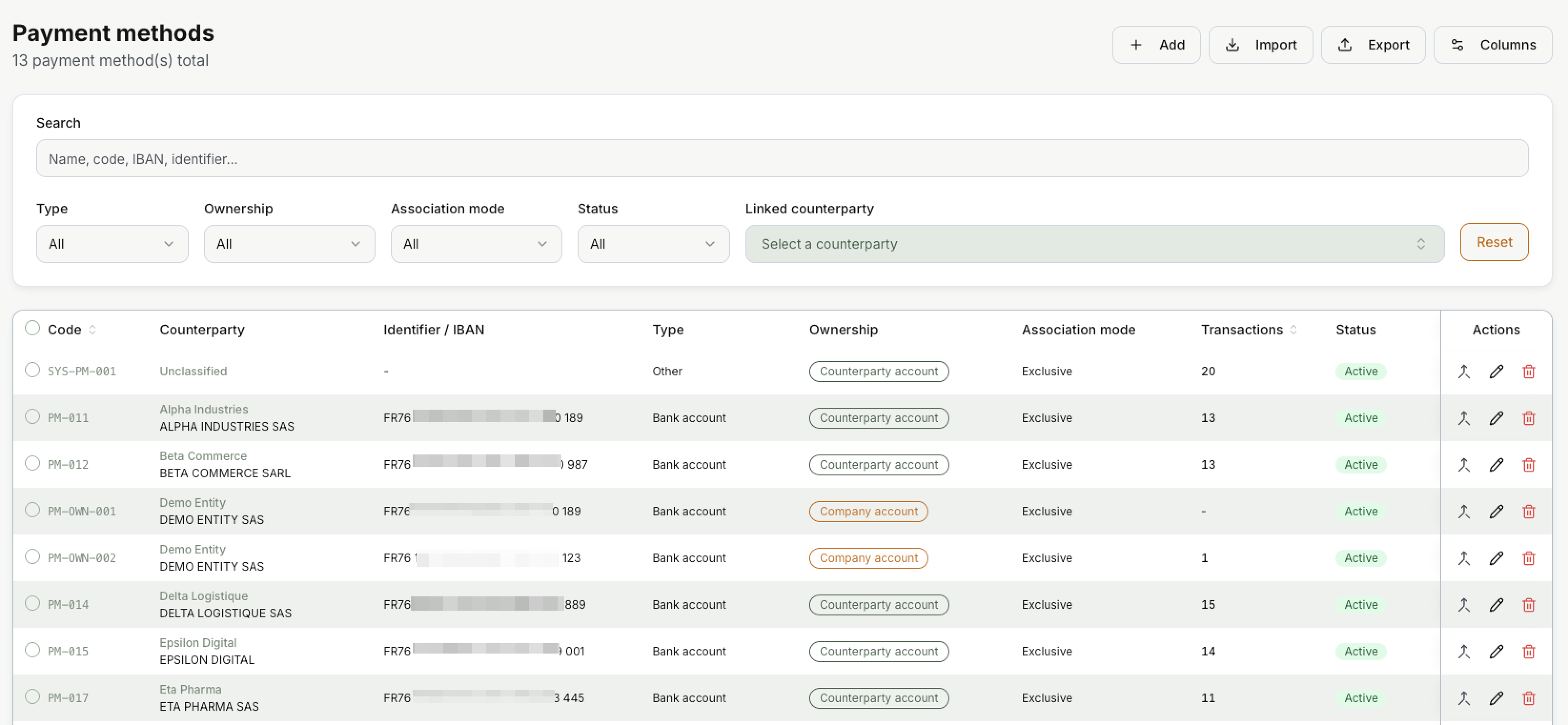 Each line is one payment method. The buttons at the top:
| Button | What it does |
| --- | --- |
| **Add** | Create one payment method by hand. |
| **Import** | Create many at once from a CSV file. |
| **Export** | Download the list. |
| **Columns** | Show or hide columns. |
Tick the circle at the start of a line to select it.
**Search** looks in the name, code, IBAN and identifier. Because account numbers are encrypted, search for one with the **whole** IBAN or account number, or with its **last four** characters: a fragment from the middle finds nothing. The filters narrow the list by **Type**, **Ownership**, **Association mode**, **Status** and **Linked counterparty**. **Reset** clears them all.
| Column | What it shows |
| --- | --- |
| **Code** | The code of the payment method, for example `PM-020`. **Connected** below it means it comes from a bank connection. |
| **Counterparty** | Who it belongs to. Select the name to open the counterparty. |
| **Identifier / IBAN** | The IBAN or account number, masked: `FR76 •••• 0189` for an IBAN, `•••• 6789` for another account number. The identifier for other types. See [How account numbers are protected](#how-account-numbers-are-protected). |
| **Type** | Bank account, Credit card, PayPal, Wero, Twint, Crypto wallet or Other. |
| **Ownership** | Who owns it. See [Ownership](#ownership). |
| **Association mode** | **Exclusive** or **Shared**. See [Exclusive or shared](#exclusive-or-shared). |
| **Transactions** | How many bank transactions use it. |
| **Status** | Active, Inactive or Error. |
| Icon | What it does |
| --- | --- |
| | Opens the merge window with this method as the target. See [Merge payment methods](https://www.invunion.com/knowledge-base/merge-payment-methods/). |
| | Opens the payment method. |
| | Deletes it. A method used by transactions cannot be deleted: merge it instead. |
### Two yellow banners
Above the list, Invunion warns you when something needs your attention:
- **"… payment method(s) have no linked counterparty."** A bank line used an IBAN that Invunion did not know. Select **Show unlinked methods**, then pick a counterparty in the **Counterparty** column. You can also create the counterparty from there.
- **"… company account(s) are missing an owner."** Invunion found one of your own accounts but does not know which company of your group owns it. Select **Show accounts missing an owner** and pick the Internal counterparty that owns it.
## Ownership
| Ownership | Meaning |
| --- | --- |
| Counterparty account | It belongs to a customer or another outside party. Payments from it identify that party. |
| Company account | It is one of your own bank accounts. Money moved between your own accounts is an internal transfer: Invunion keeps it out of invoice matching, unless an internal invoice or credit note exists. |
| Owner missing | Invunion thinks it is one of your accounts, but no Internal counterparty owns it yet. |
| Unassigned | Nobody owns it yet. Its transactions stay on **Unclassified** until you assign it. |
## Exclusive or shared
By default, a payment method is **Exclusive**: it belongs to one counterparty. A payment from it tells Invunion who paid.
Choose **Shared** when several counterparties really pay from the same account, for example a holding company that pays for its subsidiaries. The list then shows **Shared · 2** with the names below, and you can add or remove a counterparty right there.
A shared method tells Invunion **which account** paid, not **which customer**. The transaction stays on **Unclassified** until an [identification rule](https://www.invunion.com/knowledge-base/identification-rules/) or a match with an invoice picks the customer. A shared method can go back to exclusive only when one counterparty is left.
## Add or edit a payment method
Select **Add**, or on a line.
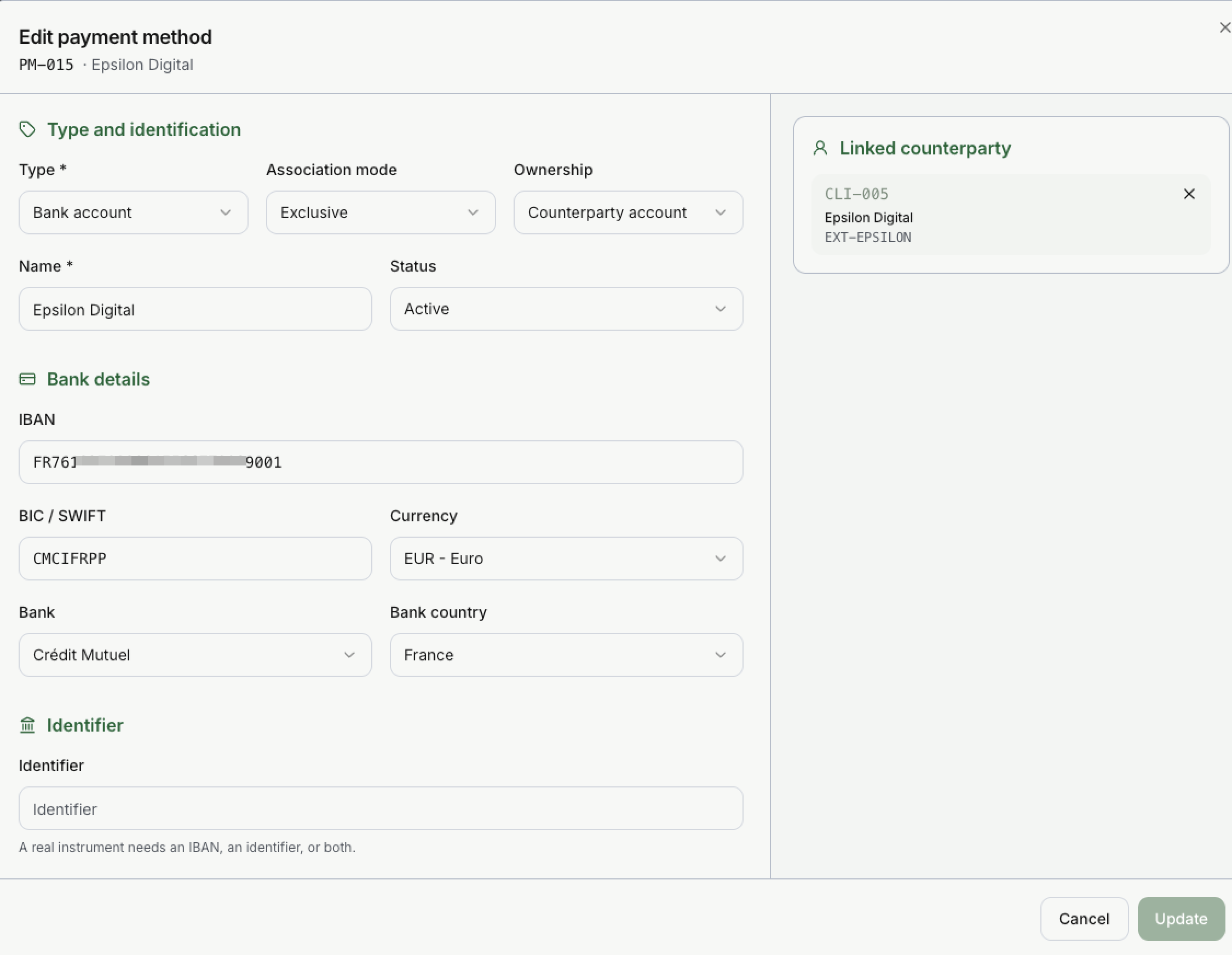 At the top, the panel shows the code and the name. In this example, PM-015 is the bank account of Epsilon Digital. It is Counterparty account and **Exclusive**, so every payment from this IBAN is from Epsilon Digital.
The panel has these parts.
### Type and identification
| Field | What it does |
| --- | --- |
| **Code** | Unique in your Entity. On **Auto**, Invunion gives the next free code: `PM-001`, `PM-002`, and so on. Switch it to type your own, for example `PM-BNP-01`. |
| **Type** | Bank account, Credit card, PayPal, Wero, Twint, Crypto wallet or Other. Required. |
| **Association mode** | Exclusive or Shared. |
| **Ownership** | Company account or Counterparty account. |
| **Name** | A label for you. Required. |
| **Status** | Active, Inactive or Error. |
### Bank details and identifier
A payment method needs an **IBAN or account number**, an **identifier**, or both. The identifier changes with the type:
| Type | Identifier |
| --- | --- |
| Bank account | The IBAN or a domestic account number, with the **BIC / SWIFT** and the **currency** (EUR by default). See [Bank accounts without an IBAN](#bank-accounts-without-an-iban). |
| Credit card | The terminal number or the last 4 digits. |
| PayPal | The PayPal email. |
| Wero | The Wero reference. |
| Twint | The Twint number. |
| Crypto wallet | The wallet address. |
For a bank account, **Bank** and **Bank country** say where the account is. When you type a BIC, Invunion fills them in for you.
Each IBAN, account number or identifier can exist **only once** in your Entity. A duplicate is refused: use [Merge](https://www.invunion.com/knowledge-base/merge-payment-methods/) instead.
Once a payment method is used by a transaction, its bank details are **locked**. For a different account, create a new payment method and set this one to **Inactive**. This keeps the history of who paid from which account.
### Bank accounts without an IBAN
Invunion recognises the IBAN of every country that uses one, and the domestic account formats of three countries that do not, or not always:
| Country | Account format | Example |
| --- | --- | --- |
| Countries with an IBAN | **IBAN**. Invunion checks its length and check digits. | `FR76 3000 6000 0112 3456 7890 189` |
| United Kingdom | **Sort code** (6 digits) and **account number** (8 digits). | `20-00-00 12345678` |
| United States | **Routing number** (ABA, 9 digits) and **account number** (4 to 17 digits). Invunion checks the routing number's check digit. | `021000021 123456789` |
| Canada | **Transit and institution number** (5 and 3 digits) and **account number** (7 to 12 digits). | `12345-003-1234567` |
Type the account in **IBAN or account number** and set the **Bank country**. Invunion reads the format and shows the parts it found, or tells you what is wrong.
A UK sort code and account number and the matching GB IBAN are the same account: a payment from either one finds the same payment method.
Bank lines work the same way. When a camt statement gives the payer's domestic account instead of an IBAN, Invunion reads the UK, US or Canadian format and finds the payment method.
Company accounts use an IBAN or an identifier for now: a sort code and account number cannot be set on a **Company account** yet.
### Owner
On the right side, the **Linked counterparty** card shows who owns the method: its code, its name and its external reference. Select to unlink it, then pick another **Counterparty**. For a **Company account**, pick the **Owning entity** instead: only Internal counterparties are listed, and you can create one from there.
A method that comes from a **bank connection** is synchronized by the bank. Some of its fields are read-only, and the panel shows its **Last synchronization**.
## How account numbers are protected
IBANs and other bank account numbers are sensitive: they say where money goes. Invunion protects them at every step.
| Where | What Invunion does |
| --- | --- |
| **Storage** | IBANs and account numbers are **encrypted** in the database: on payment methods, on counterparties, on transactions and in the original bank files. |
| **On screen** | They are shown **masked**: `FR76 •••• 0189` for an IBAN (the country and check digits name no account), `•••• 6789` for another account number. |
| **Full number** | An admin can select **Show the full number (admins only, logged)**. Each reveal is recorded in the [Audit log](https://www.invunion.com/knowledge-base/audit-log/). |
| **API and webhooks** | Responses and webhook payloads carry masked numbers. An API key needs the **Reveal full account numbers** permission to read a full number, and each read is logged. See [API keys](https://www.invunion.com/knowledge-base/api-keys/). |
| **Changes** | Bank details are locked once a payment method is used, and each change to a payment method is recorded in the audit log. |
| **New account on a counterparty** | The event **counterparty.bank_account_linked** tells you when a bank account starts identifying a counterparty, so you can check it. See [Notifications](https://www.invunion.com/knowledge-base/notifications/) and [Webhooks](https://www.invunion.com/knowledge-base/webhooks/). |
The masked number is enough for everyday work: matching, identification rules and merges use the full number inside Invunion, without showing it.
## Default payment methods
| Code | What it is |
| --- | --- |
| `SYS-PM-001` | The **Default System** payment method of the **Unclassified** counterparty (`SYS-CPT-001`). Transactions that match no known payment method land here. |
| **Default** | Each counterparty gets its own **Default** payment method when it is created. It is a place to attach an IBAN later. It cannot be deleted. |
## Other ways to create payment methods
| Source | What happens |
| --- | --- |
| **Add** | You create one payment method. |
| **Import** | You create many at once from a CSV file. |
| **API** | One at a time, or up to 500 per call. See the [API reference](https://www.invunion.com/knowledge-base/api/list-payment-methods/). |
| **New counterparty** | It gets a Default payment method. If you give an IBAN, the method is created at once. |
| **Bank line** | A bank line with an unknown IBAN, account number or identifier creates a method. It stays Unassigned until you link it. |
An IBAN that already belongs to another counterparty is never taken over. The existing method is kept.
## Limits to keep in mind
- A payment method tells Invunion who paid, not which invoice is paid.
- Some payment providers send money for many customers from the same account. Mark such a method as **Shared**, or leave it unassigned.
- Accounts from a bank connection are managed in **Bank connections**, not deleted from this list. Disconnecting a bank keeps the transactions already imported.