# Merge payment methods
> Imports sometimes create the same bank account twice. Merge joins duplicate payment methods into one. You pick a target that keeps the history, add the duplicates, and merge. Their transactions move to the target, and missing details on the target are filled in from them. Default and bank-connection methods have limits.
Source: https://www.invunion.com/knowledge-base/merge-payment-methods/
Last updated: 2026-10-14
Imports sometimes create the same account twice. **Merge** joins them into one.
1. Select on the method to keep, or tick several lines and select **Merge selection**.
2. In **Merge payment methods**, the **Target** keeps the history. Invunion lists **Suggested duplicates** when it finds some.
3. To add another method, type its name, code or IBAN under **Add manually**, select the search icon, then **Add**.
4. Use **Set as target** or **Remove from group** to adjust.
5. Select **Merge … method(s)**. The number counts the methods that will be merged into the target.
Each method shows its code, its number of transactions (**15 tx**), its IBAN and its counterparty.
The other methods are deleted. Their transactions move to the target, and missing details on the target (IBAN, BIC, identifier, counterparty) are filled in from them.
A **Default** payment method can only be the target, never merged away. Methods from a bank connection cannot be merged here.
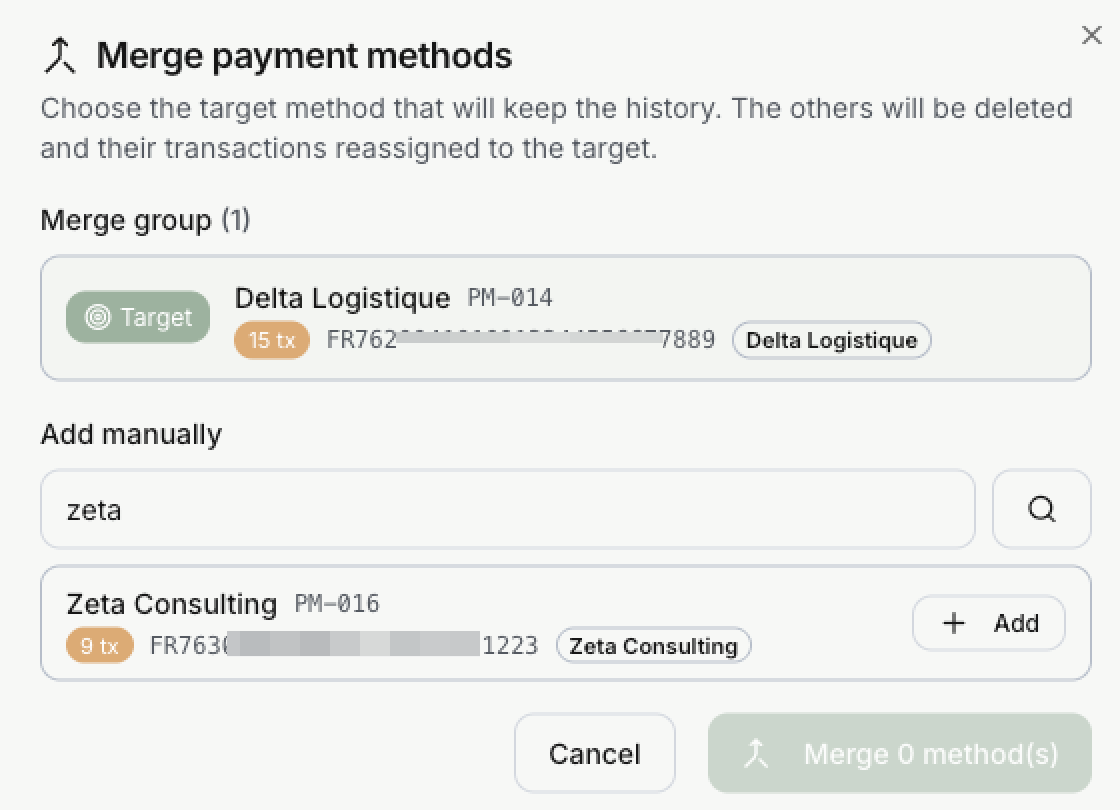 Each method shows its code, its number of transactions (**15 tx**), its IBAN and its counterparty.
The other methods are deleted. Their transactions move to the target, and missing details on the target (IBAN, BIC, identifier, counterparty) are filled in from them.
A **Default** payment method can only be the target, never merged away. Methods from a bank connection cannot be merged here.