# Match from a transaction
> Start from a transaction when money came in and you want to know which invoice it pays. Quick match lists the open invoices of the customer. Pick one, or several when one payment pays more than one. Worked examples show the status of the transaction and of the invoices before and after each match, including a payment bigger than the invoice.
Source: https://www.invunion.com/knowledge-base/match-from-transaction/
Last updated: 2026-10-15
**Transactions** in the menu. Start from a transaction when money came in and you want to know which invoice it pays.
## Quick match
Select on the line of the transaction. The icon shows when the line is To process, Unmatched or Partially matched, and something is left to match.
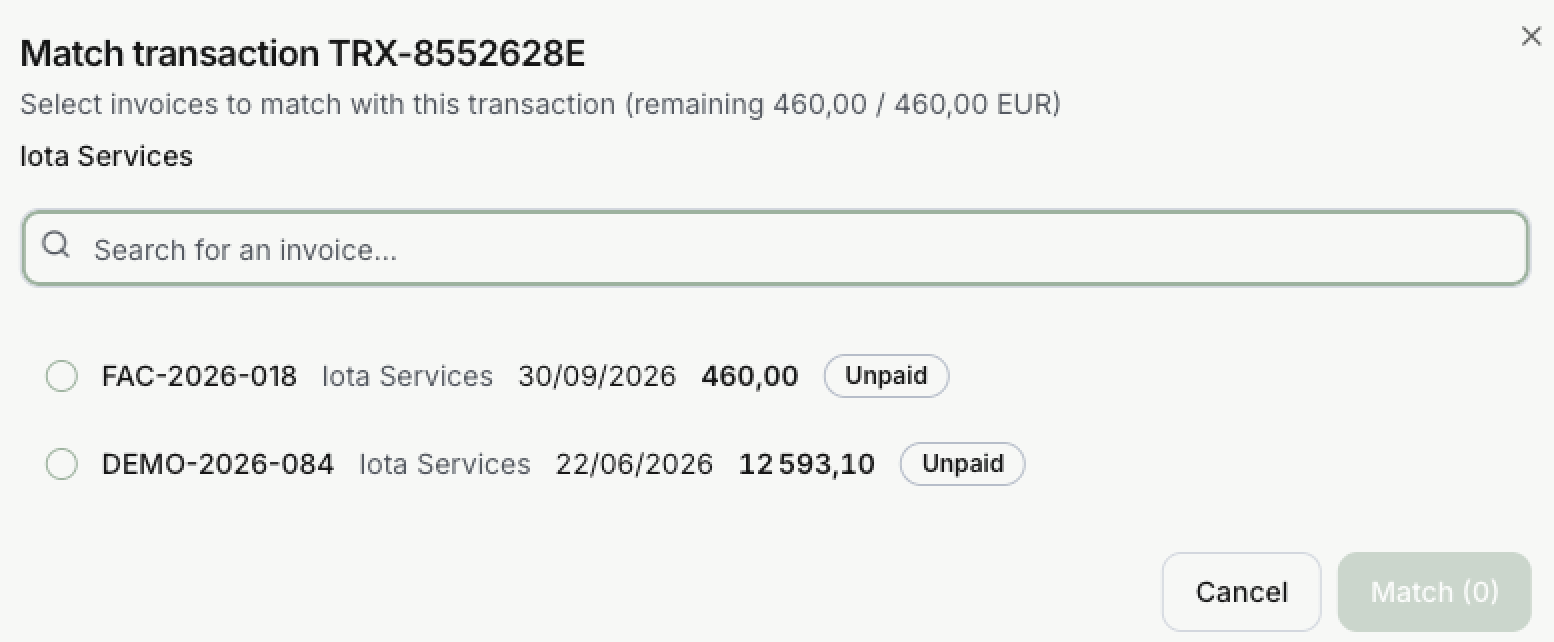
1. The window shows what is left to match, out of the total: here **460,00 / 460,00 EUR**.
2. It lists the open invoices of the counterparty. Use **Search for an invoice…** to find one by its number.
3. Select one or more invoices. For each one, **Allocated** is filled in: the smaller of what the invoice still asks and what is left on the payment. You can change it.
4. Select **Match (1)**. **Total allocated** shows how much of the payment you used.
For money received, Invunion lists invoices. For money sent, it lists credit notes: the payment is then a refund.
### One payment for several invoices
Tick each invoice the payment covers. The first ones take what they need, and the next one gets what is left. **Total allocated** can never go past what is left on the payment.
## From the edit panel
Select on the line of the transaction. On the right, under **Linked invoices**:
- **Add an invoice…** picks an invoice to match.
- **Allocated amount** shows the part of the payment that goes to each invoice. You can change it.
Nothing is saved until you select **Save**. See [Summary and relationships](https://www.invunion.com/knowledge-base/transactions/#summary-and-relationships).
## From the Match inbox
The Match inbox shows the pairs Invunion suggests but did not confirm by itself, one at a time. Select **Clear unmatched** on the Dashboard, then **Confirm match**, **Skip** or **Not a match**. The inbox is explained in [Dashboard metrics](https://www.invunion.com/knowledge-base/dashboard-metrics/#match-inbox).
## Example: one payment, two invoices
Alpha Industries sends **1 000,00 €** for two invoices: invoice A for **600,00** and invoice B for **400,00**.
| Step | Transaction | Remaining | Invoice A (600,00) | Invoice B (400,00) |
| --- | --- | --- | --- | --- |
| The payment arrives | To process | 1 000,00 | Unpaid | Unpaid |
| You match invoice A | Partially matched | 400,00 | Paid | Unpaid |
| You match invoice B | Matched | 0,00 | Paid | Paid |
You can also tick both invoices in one go: the result is the same.
## Example: a payment bigger than the invoice
Iota Services sends **490,11 €**. Invunion suggests invoice **FAC-2026-018**, for **460,00 €**, in the Match inbox. **Allocate** shows **460**, because the invoice asks no more.
| Step | Transaction | Remaining | Invoice FAC-2026-018 | Amount due |
| --- | --- | --- | --- | --- |
| Before | Unmatched | 490,11 | Unpaid | 460,00 |
| You select **Confirm match** | Partially matched | 30,11 | Paid | 0,00 |
The **30,11** left can pay another invoice of the same customer. Until then, it counts in the **Pending amount** of **Transaction matching** on the Dashboard.
## When no invoice is offered
Check, in this order:
1. **The direction.** Money received pays invoices, money sent pays back credit notes.
2. **The counterparty.** Only the invoices of the transaction's counterparty are listed. Change it in the edit panel if it is wrong.
3. **The currency.** Without [Currency conversion](https://www.invunion.com/knowledge-base/currency-conversion/), the invoice must be in the currency of the payment.
4. **The invoice.** It must be open: not Paid and not Cancelled.
5. **The status.** An Ignored line cannot be matched. See [Ignore or include a line](https://www.invunion.com/knowledge-base/transaction-status-scope/#ignore-or-include-a-line).
 1. The window shows what is left to match, out of the total: here **460,00 / 460,00 EUR**.
2. It lists the open invoices of the counterparty. Use **Search for an invoice…** to find one by its number.
3. Select one or more invoices. For each one, **Allocated** is filled in: the smaller of what the invoice still asks and what is left on the payment. You can change it.
4. Select **Match (1)**. **Total allocated** shows how much of the payment you used.
For money received, Invunion lists invoices. For money sent, it lists credit notes: the payment is then a refund.
### One payment for several invoices
Tick each invoice the payment covers. The first ones take what they need, and the next one gets what is left. **Total allocated** can never go past what is left on the payment.
## From the edit panel
Select on the line of the transaction. On the right, under **Linked invoices**:
- **Add an invoice…** picks an invoice to match.
- **Allocated amount** shows the part of the payment that goes to each invoice. You can change it.
Nothing is saved until you select **Save**. See [Summary and relationships](https://www.invunion.com/knowledge-base/transactions/#summary-and-relationships).
## From the Match inbox
The Match inbox shows the pairs Invunion suggests but did not confirm by itself, one at a time. Select **Clear unmatched** on the Dashboard, then **Confirm match**, **Skip** or **Not a match**. The inbox is explained in [Dashboard metrics](https://www.invunion.com/knowledge-base/dashboard-metrics/#match-inbox).
## Example: one payment, two invoices
Alpha Industries sends **1 000,00 €** for two invoices: invoice A for **600,00** and invoice B for **400,00**.
| Step | Transaction | Remaining | Invoice A (600,00) | Invoice B (400,00) |
| --- | --- | --- | --- | --- |
| The payment arrives | To process | 1 000,00 | Unpaid | Unpaid |
| You match invoice A | Partially matched | 400,00 | Paid | Unpaid |
| You match invoice B | Matched | 0,00 | Paid | Paid |
You can also tick both invoices in one go: the result is the same.
## Example: a payment bigger than the invoice
Iota Services sends **490,11 €**. Invunion suggests invoice **FAC-2026-018**, for **460,00 €**, in the Match inbox. **Allocate** shows **460**, because the invoice asks no more.
| Step | Transaction | Remaining | Invoice FAC-2026-018 | Amount due |
| --- | --- | --- | --- | --- |
| Before | Unmatched | 490,11 | Unpaid | 460,00 |
| You select **Confirm match** | Partially matched | 30,11 | Paid | 0,00 |
The **30,11** left can pay another invoice of the same customer. Until then, it counts in the **Pending amount** of **Transaction matching** on the Dashboard.
## When no invoice is offered
Check, in this order:
1. **The direction.** Money received pays invoices, money sent pays back credit notes.
2. **The counterparty.** Only the invoices of the transaction's counterparty are listed. Change it in the edit panel if it is wrong.
3. **The currency.** Without [Currency conversion](https://www.invunion.com/knowledge-base/currency-conversion/), the invoice must be in the currency of the payment.
4. **The invoice.** It must be open: not Paid and not Cancelled.
5. **The status.** An Ignored line cannot be matched. See [Ignore or include a line](https://www.invunion.com/knowledge-base/transaction-status-scope/#ignore-or-include-a-line).