# Counterparties
> A counterparty is a company or a person you deal with, most often a customer. Invunion links every invoice and bank transaction to one, so it knows who paid. This page covers the list, its columns and filters, how to add or edit a counterparty and its roles, the two system counterparties, and the other ways to create counterparties.
Source: https://www.invunion.com/knowledge-base/counterparties/
Last updated: 2026-10-22
**Counterparties** in the menu. A counterparty is a company or a person you deal with. Most of the time it is a **customer**: someone you send invoices to and who pays you.
Invunion links every invoice and every bank transaction to a counterparty. That is how it knows **who** paid.
## How counterparties work
Each counterparty has three things:
1. **Who it is**: a code, a name, a VAT number, an address.
2. **What it is to you**: one or more roles, such as Customer or Supplier.
3. **How it pays**: a **status** for today and a **payer score** for the last 12 months.
## The Counterparties list
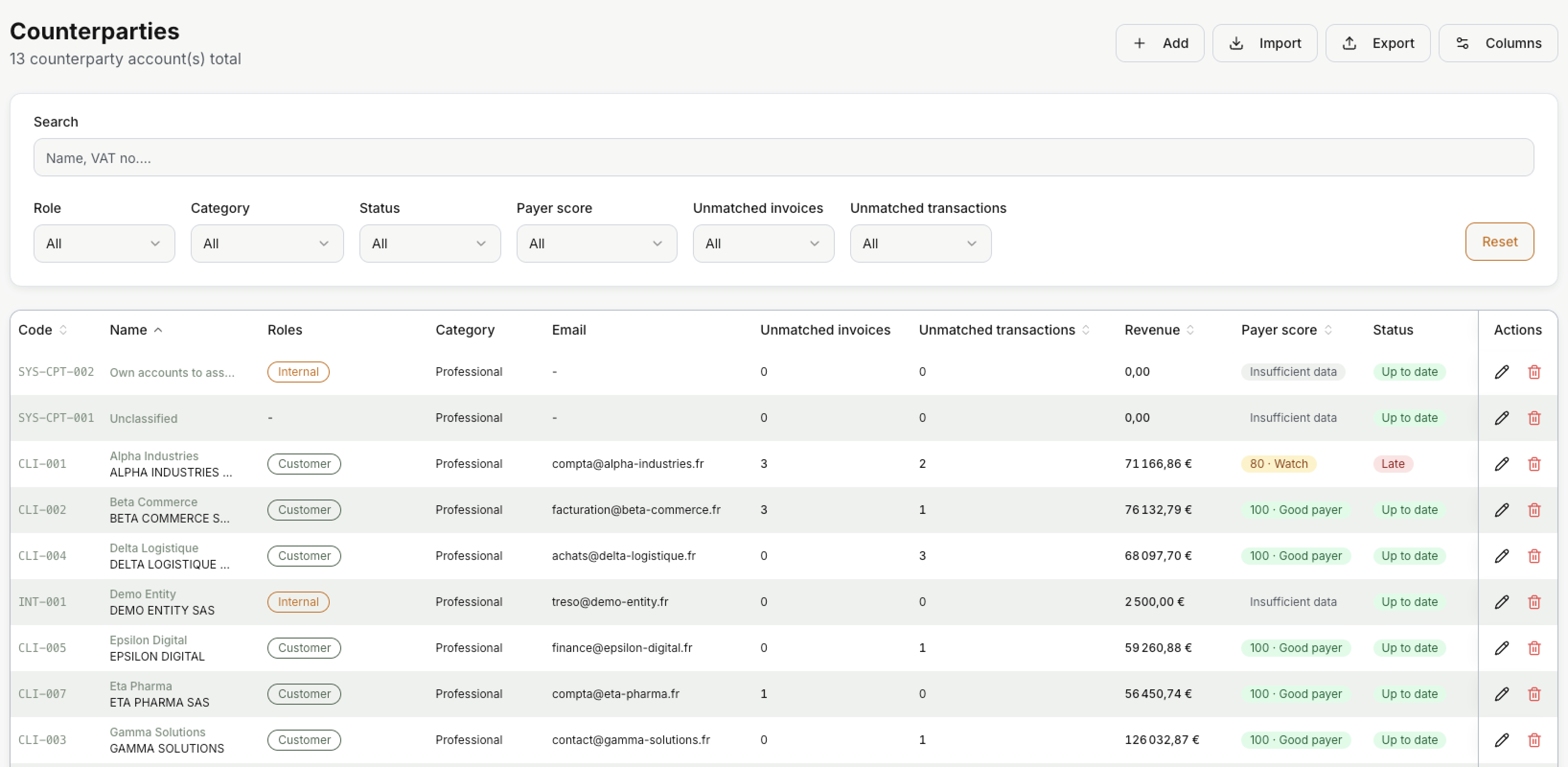
Each line is one counterparty. The buttons at the top:
| Button | What it does |
| --- | --- |
| **Add** | Create one counterparty by hand. |
| **Import** | Create many at once from a CSV file. |
| **Export** | Download the list. |
| **Columns** | Show or hide columns. |
**Search** looks in the name, display name, VAT number, code, city and country. The filters narrow the list by **Role**, **Category**, **Status**, **Payer score**, and whether there are **Unmatched invoices** or **Unmatched transactions**. **Reset** clears them all.
| Column | What it shows |
| --- | --- |
| **Code** | The counterparty code, for example `CLI-001`. |
| **Name** | The display name on top, the original name below. |
| **Roles** | The roles of the counterparty. |
| **Unmatched invoices** | Invoices still to be paid: unpaid, partly paid or overdue. Credit notes are not counted. |
| **Unmatched transactions** | Bank transactions of this counterparty with an amount still to settle. |
| **Revenue** | The total of the money received from this counterparty, per currency. |
| **Payer score** | How well they paid over the last 12 months. See [Payer score](https://www.invunion.com/knowledge-base/counterparty-status-payer-score/#payer-score). |
| **Status** | If an invoice is overdue today. See [Status](https://www.invunion.com/knowledge-base/counterparty-status-payer-score/#status-up-to-date-or-late). |
| Icon | What it does |
| --- | --- |
| | Opens the counterparty in the edit panel. |
| | Deletes the counterparty. The system counterparties cannot be deleted. |
## Add or edit a counterparty
Select **Add**, or on a line.
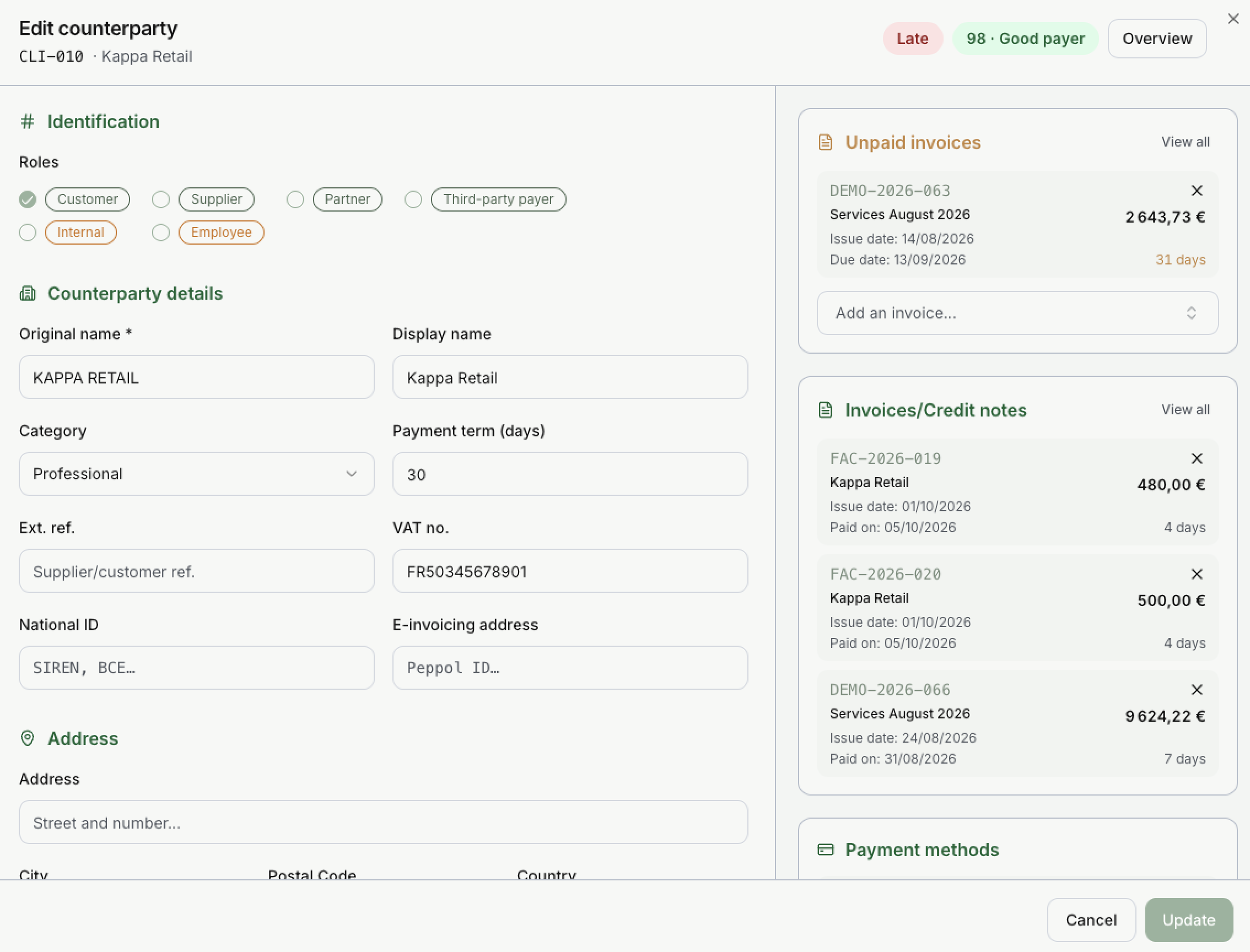
At the top, the panel shows the code, the name, the status and the payer score. **Overview** opens the full page of the counterparty. See [Overview page](https://www.invunion.com/knowledge-base/counterparty-overview/).
In this example, Kappa Retail is Late because invoice DEMO-2026-063 was due on 13/09/2026 and is still unpaid, 31 days later. It is still a 98 · Good payer, because it paid its other invoices within a few days.
### Identification
**Counterparty code.** Unique in your Entity. Choose **Auto** and Invunion gives the next free code: `CPT-001`, `CPT-002`, and so on. Choose **Custom** to type your own, for example the code from your ERP. The code is what the API uses, and it helps a lot to recognise the customer when you import invoices.
**Roles.** Tick one or more. A new counterparty is a Customer unless you change it.
| Role | Use it for |
| --- | --- |
| Customer | Someone you invoice. Most reconciliation work is about customers. |
| Supplier | Someone you buy from. |
| Partner | A partner company. |
| Third-party payer | Someone who pays for a customer, such as a parent company or a factor. |
| Internal | A company of your own group. |
| Employee | A person who works for you. |
Green roles are outside parties. Orange roles are on your side.
### Counterparty details
| Field | What it does |
| --- | --- |
| **Original name** | The legal name. Required. Invunion compares it with bank lines and invoices. |
| **Display name** | A shorter name shown in lists. |
| **Category** | **Professional**, **Individual** or **Governmental**. Professional by default. |
| **Payment term (days)** | Whole days from 0 to 365. Used to set a due date when an imported invoice has none. Leave it empty to use the default of your Entity (30 days unless changed). It never replaces a due date that is already on the invoice. |
| **Ext. ref.** | The reference of this customer in another tool. |
| **VAT no.** | The VAT number. |
| **National ID** | The company number, such as a SIREN or a BCE number. |
| **E-invoicing address** | The Peppol ID, for e-invoicing. |
Below come **Address**, **Contacts** (phone and email), **Accounting** (Analytic 1 and Analytic 2), and **Metadata**.
**Metadata** holds anything that has no field of its own, such as a CRM ID or the name of the person who chases payments. Keys that start with `_` are hidden in tables.
### Invoices and payment methods
On the right side of the panel:
- **Unpaid invoices**: the invoices still to be paid. The orange number is how many days they are overdue.
- **Invoices/Credit notes**: the paid documents, with the number of days it took to be paid.
- **Payment methods**: the IBANs, account numbers and other [payment methods](https://www.invunion.com/knowledge-base/payment-methods/) of the counterparty. Account numbers are stored encrypted and shown masked.
Use **Add an invoice…** to link an invoice to this counterparty, and to unlink one. Nothing is saved until you select **Update**.
## System counterparties
Every Entity has two counterparties created by Invunion. You cannot delete them, and they never get a payer score.
| Code | Name | What it is for |
| --- | --- | --- |
| `SYS-CPT-001` | **Unclassified** | Invoices and transactions that Invunion cannot link to anyone land here. Credit from the customer wallet is never applied to it. |
| `SYS-CPT-002` | **Own accounts to assign** | Your own bank accounts that were found but not yet linked to an Internal counterparty. Move them to the right one. |
They are listed first when no filter is active.
## Other ways to create counterparties
| Source | What happens |
| --- | --- |
| **Add** | You create one counterparty. |
| **Import** | You create many at once from a CSV file. |
| **API** | One at a time, or up to 500 per call. See the [API reference](https://www.invunion.com/knowledge-base/api/list-counterparties/). |
| **Invoice import** | When an imported invoice names a customer Invunion does not know, the customer is created. |
Each new counterparty also gets a **Default** payment method. It is the place where its IBAN or other identifiers go later. If you give an IBAN at creation, the payment method is created at once.
## Limits to keep in mind
- A name in a bank line that looks like a customer is not proof on its own.
- Some payment providers send money for many customers from the same account. Their payment method may not belong to one counterparty.
- Supplier invoices and outgoing expenses are not reconciled yet, even if the supplier exists as a counterparty.
 Each line is one counterparty. The buttons at the top:
| Button | What it does |
| --- | --- |
| **Add** | Create one counterparty by hand. |
| **Import** | Create many at once from a CSV file. |
| **Export** | Download the list. |
| **Columns** | Show or hide columns. |
**Search** looks in the name, display name, VAT number, code, city and country. The filters narrow the list by **Role**, **Category**, **Status**, **Payer score**, and whether there are **Unmatched invoices** or **Unmatched transactions**. **Reset** clears them all.
| Column | What it shows |
| --- | --- |
| **Code** | The counterparty code, for example `CLI-001`. |
| **Name** | The display name on top, the original name below. |
| **Roles** | The roles of the counterparty. |
| **Unmatched invoices** | Invoices still to be paid: unpaid, partly paid or overdue. Credit notes are not counted. |
| **Unmatched transactions** | Bank transactions of this counterparty with an amount still to settle. |
| **Revenue** | The total of the money received from this counterparty, per currency. |
| **Payer score** | How well they paid over the last 12 months. See [Payer score](https://www.invunion.com/knowledge-base/counterparty-status-payer-score/#payer-score). |
| **Status** | If an invoice is overdue today. See [Status](https://www.invunion.com/knowledge-base/counterparty-status-payer-score/#status-up-to-date-or-late). |
| Icon | What it does |
| --- | --- |
| | Opens the counterparty in the edit panel. |
| | Deletes the counterparty. The system counterparties cannot be deleted. |
## Add or edit a counterparty
Select **Add**, or on a line.
 At the top, the panel shows the code, the name, the status and the payer score. **Overview** opens the full page of the counterparty. See [Overview page](https://www.invunion.com/knowledge-base/counterparty-overview/).
In this example, Kappa Retail is Late because invoice DEMO-2026-063 was due on 13/09/2026 and is still unpaid, 31 days later. It is still a 98 · Good payer, because it paid its other invoices within a few days.
### Identification
**Counterparty code.** Unique in your Entity. Choose **Auto** and Invunion gives the next free code: `CPT-001`, `CPT-002`, and so on. Choose **Custom** to type your own, for example the code from your ERP. The code is what the API uses, and it helps a lot to recognise the customer when you import invoices.
**Roles.** Tick one or more. A new counterparty is a Customer unless you change it.
| Role | Use it for |
| --- | --- |
| Customer | Someone you invoice. Most reconciliation work is about customers. |
| Supplier | Someone you buy from. |
| Partner | A partner company. |
| Third-party payer | Someone who pays for a customer, such as a parent company or a factor. |
| Internal | A company of your own group. |
| Employee | A person who works for you. |
Green roles are outside parties. Orange roles are on your side.
### Counterparty details
| Field | What it does |
| --- | --- |
| **Original name** | The legal name. Required. Invunion compares it with bank lines and invoices. |
| **Display name** | A shorter name shown in lists. |
| **Category** | **Professional**, **Individual** or **Governmental**. Professional by default. |
| **Payment term (days)** | Whole days from 0 to 365. Used to set a due date when an imported invoice has none. Leave it empty to use the default of your Entity (30 days unless changed). It never replaces a due date that is already on the invoice. |
| **Ext. ref.** | The reference of this customer in another tool. |
| **VAT no.** | The VAT number. |
| **National ID** | The company number, such as a SIREN or a BCE number. |
| **E-invoicing address** | The Peppol ID, for e-invoicing. |
Below come **Address**, **Contacts** (phone and email), **Accounting** (Analytic 1 and Analytic 2), and **Metadata**.
**Metadata** holds anything that has no field of its own, such as a CRM ID or the name of the person who chases payments. Keys that start with `_` are hidden in tables.
### Invoices and payment methods
On the right side of the panel:
- **Unpaid invoices**: the invoices still to be paid. The orange number is how many days they are overdue.
- **Invoices/Credit notes**: the paid documents, with the number of days it took to be paid.
- **Payment methods**: the IBANs, account numbers and other [payment methods](https://www.invunion.com/knowledge-base/payment-methods/) of the counterparty. Account numbers are stored encrypted and shown masked.
Use **Add an invoice…** to link an invoice to this counterparty, and to unlink one. Nothing is saved until you select **Update**.
## System counterparties
Every Entity has two counterparties created by Invunion. You cannot delete them, and they never get a payer score.
| Code | Name | What it is for |
| --- | --- | --- |
| `SYS-CPT-001` | **Unclassified** | Invoices and transactions that Invunion cannot link to anyone land here. Credit from the customer wallet is never applied to it. |
| `SYS-CPT-002` | **Own accounts to assign** | Your own bank accounts that were found but not yet linked to an Internal counterparty. Move them to the right one. |
They are listed first when no filter is active.
## Other ways to create counterparties
| Source | What happens |
| --- | --- |
| **Add** | You create one counterparty. |
| **Import** | You create many at once from a CSV file. |
| **API** | One at a time, or up to 500 per call. See the [API reference](https://www.invunion.com/knowledge-base/api/list-counterparties/). |
| **Invoice import** | When an imported invoice names a customer Invunion does not know, the customer is created. |
Each new counterparty also gets a **Default** payment method. It is the place where its IBAN or other identifiers go later. If you give an IBAN at creation, the payment method is created at once.
## Limits to keep in mind
- A name in a bank line that looks like a customer is not proof on its own.
- Some payment providers send money for many customers from the same account. Their payment method may not belong to one counterparty.
- Supplier invoices and outgoing expenses are not reconciled yet, even if the supplier exists as a counterparty.